Encoder Obfuscation Mode
This option determines how hidden email addresses and phone numbers appear on your site before they are decoded. Please open your Anti-Spam plugin's settings (WordPress Dashboard → Settings → Anti-Spam by CleanTalk → Advanced settings) and select the required encoder obfuscation mode.

The display methods:
Blur effect
The contact information will be partially obscured with a blur effect:

Replace with "*"
The contact information will be partially replaced with asterisk (*) symbols:

Replace with custom text
The entire contact information will be replaced with custom text that you provide in the relevant settings field.

Result

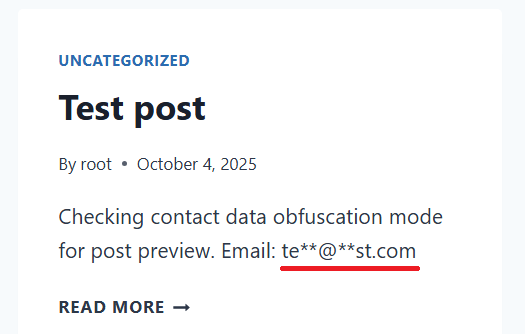
Note: The obfuscation mode option will not apply to the blog post previews. Email addresses in the previews will always be masked by '*'. This is due to WordPress technical restrictions for previews.
Haben Sie nicht gefunden, wonach Sie gesucht haben? Wenden Sie sich an unser technisches Supportteam, um Unterstützung zu erhalten.
Das könnte ebenfalls interessant sein
- WordPress Malware Removal – Clean Your Site Fastp { font-size: 14pt; } /* Make images fluid by default */ img { max-width: 100%; height:...
- Encoding Contact Data with a Shortcode and Hook for Third-Party PluginsEncoding Contact Data with a Shortcode and Hook for Third-Party Plugins Hook for Excluding Pages from...
- Installing the CleanTalk Anti-Spam Plugin in WordPressHow to install the CleanTalk Anti-Spam Plugin in WordPress Video guide — Anti-Spam Plugin Installation...
