FAQ — Payment
- Is it paid?
- Description of the payment process for a CleanTalk Anti-Spam license
- I want to connect two resources to the service. Do I have to register two accounts, or can I use the same key?
- What if I can't find a price list of a suitable package?
- Is there any auto-payment or auto-extension service?
- Cases of refunds, getting invoices, correcting the wrong payments, and stopping the CleanTalk service
- Billing Pay-As-You-Go
Yes, the service is paid; please see the price. You have 7 days trial to test the anti-spam on your website.
Description of the payment process for CleanTalk Anti-Spam license
You can read a detailed payment guide here.
I want to connect two resources to the service. Do I have to register two accounts, or can I use the same key?
Both sites can be connected to one account, with a separate Access key for each website.
What if I can't find a price list of a suitable package?
More efficient packages are available after registration in your Dashboard.
Is there any auto-payment or auto-extension service?
Yes, auto-payments are available for the following products:
- Anti-Spam by CleanTalk annual subscription [https://cleantalk.org/price-anti-spam]
- Blocklist Database [https://cleantalk.org/price-database-api]
- Hosting Anti-Spam monthly subscription [https://cleantalk.org/price-hosting-anti-spam]
- CleanTalk WordPress Security annual subscription [https://cleantalk.org/price-wordpress-security]
You can enable auto-payments at the moment of purchasing/renewal subscriptions only; use the page “Checkout page”: https://p.cleantalk.org/

You can disable auto-payments anytime with the appropriate link on the page “Licenses & billing”: https://cleantalk.org/my/payments

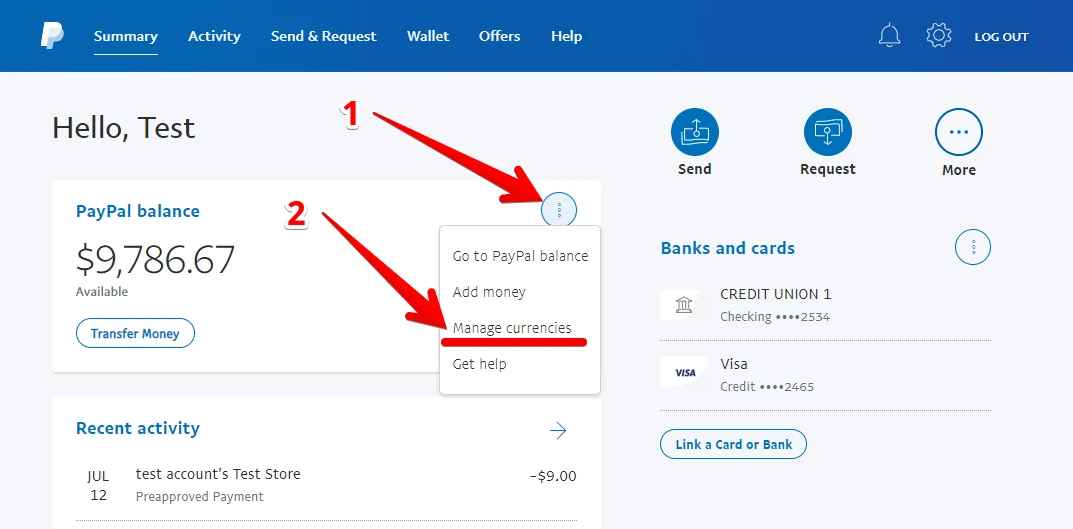
Keep in mind that you can change your preferred method of payment in your PayPal account. Do the following:
• Go to the Summary page of your PayPal account. Click the three vertical dots next to your "PayPal balance" title and choose "Manage currencies".
• Then choose a payment method you want and click "Set as preferred". See the screenshots below for clarification.

More details are here:
• What payment methods can I use with PayPal?
• How do I change my payment method during checkout?
Cases of refunds, getting invoices, correcting the wrong payments, and stopping the CleanTalk service
Please use these short guides:
Pay as you go
See the details here:
https://cleantalk.org/help/billing-pay-as-you-go
Haben Sie nicht gefunden, wonach Sie gesucht haben? Wenden Sie sich an unser technisches Supportteam, um Unterstützung zu erhalten.
Das könnte ebenfalls interessant sein
- FAQ and Troubleshooting about Anti-Spam FAQ About CleanTalk Anti-Spam Features How do IP/Email blacklists work? Is CleanTalk Compatible with...
- Updating the CleanTalk Anti-Spam Extension on OpenCart 3.xHow to Update the CleanTalk Anti-Spam Extension on OpenCart 3.x 1. Go to the OpenCart Administrator...
- Installation of the CleanTalk Anti-Spam Extension in OpenCart 3.xHow to Install the CleanTalk Anti-Spam Extension in OpenCart 3.x Note: For installation instructions...
