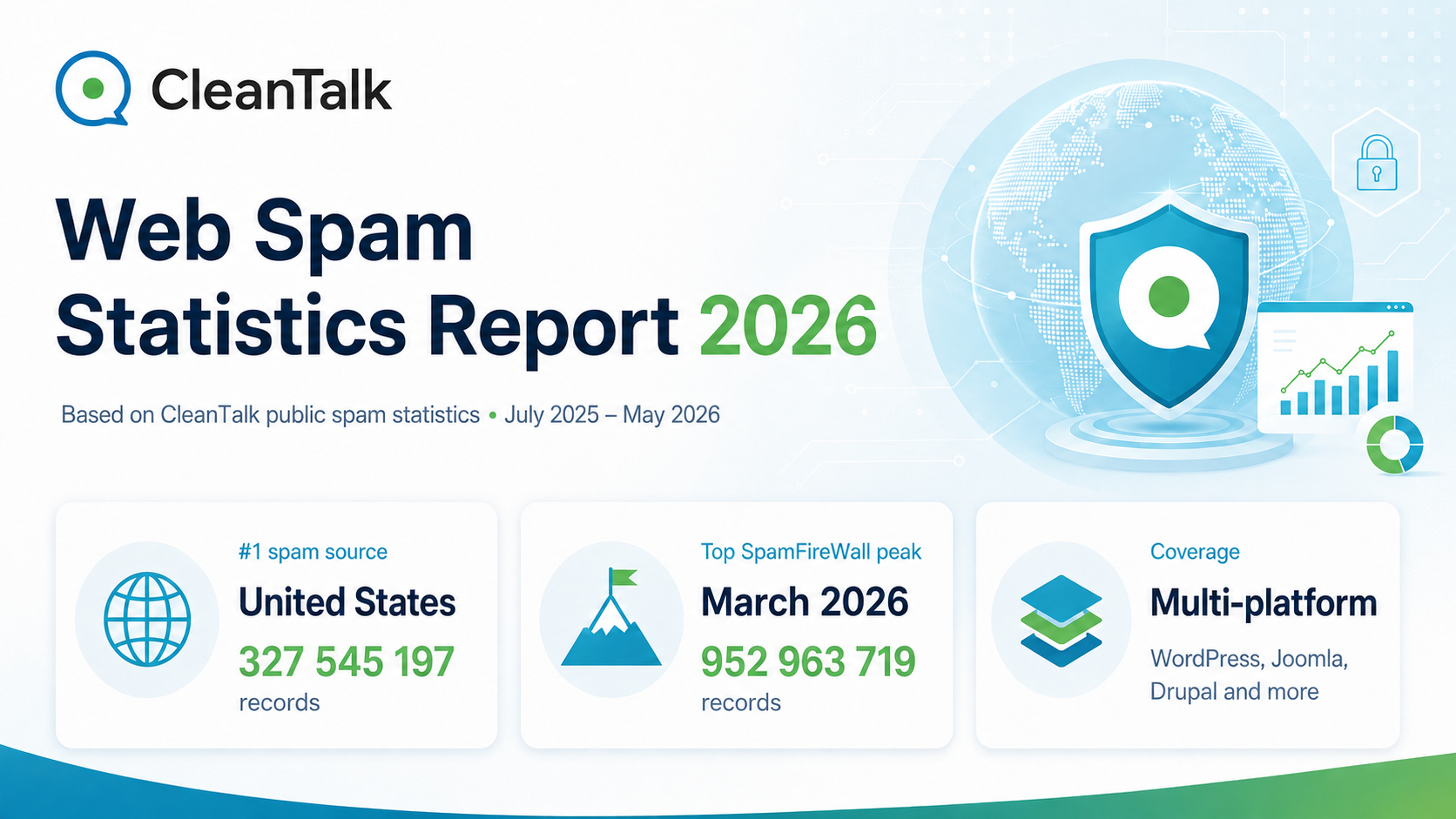
Spam is no longer just a problem of unwanted comments. Today, spam affects website forms, registrations, comments, checkout flows, forums, newsletter signups, and other places where users can submit information.
For website owners, this means spam protection is not just a small technical add-on. It is part of website security, data quality, user experience, and business operations.
This report summarizes key spam trends based on CleanTalk public spam statistics for July 2025 – May 2026 and confirmed aggregated totals for Anti-Spam, SpamFireWall, and Security layers. It focuses on spam sources by country, monthly attack dynamics, protection-layer activity, CMS-level visibility, and practical website spam risks.
The goal is to show where spam-related traffic comes from, how protection layers handle it, which platforms appear in the public statistics, and why website owners need spam protection that works without creating unnecessary friction for real users.
Key findings
CleanTalk public spam statistics show that spam activity is global and distributed across countries, protection layers, and CMS or community platforms.
In the visible CleanTalk statistics dataset for July 2025 – May 2026, the United States is the largest source of spam-related traffic, with 327,545,197 records and 28.83% of the shown total. The Netherlands follows with 150,226,967 records and 13.22%. Other major visible sources include Germany, China, Singapore, the Russian Federation, Brazil, Ukraine, France, and the United Kingdom.
At the platform level, CleanTalk public statistics show spam attack dynamics for many CMS and community platforms, including WordPress, Joomla, Drupal, Magento, OpenCart, phpBB, vBulletin, IP.Board, XenForo, Bitrix, PrestaShop, MediaWiki, MyBB, Craft CMS, Typo3, ModX Revolution, IPS Community Suite, and others.
Confirmed aggregated protection-layer totals also show the scale of filtering activity. Anti-Spam processed 2,171,763,173 checks and blocked 1,528,980,449 of them. SpamFireWall processed 8,721,143,380 requests and blocked 8,247,134,832. The Security layer processed 204,084,650,712 events.
This confirms that spam protection is not limited to visible form submissions. A large share of unwanted or suspicious activity can be filtered earlier, before it becomes visible to website owners.
Confirmed protection-layer totals
In addition to the public CleanTalk spam statistics page, confirmed aggregated totals show how much activity was handled across several protection layers.
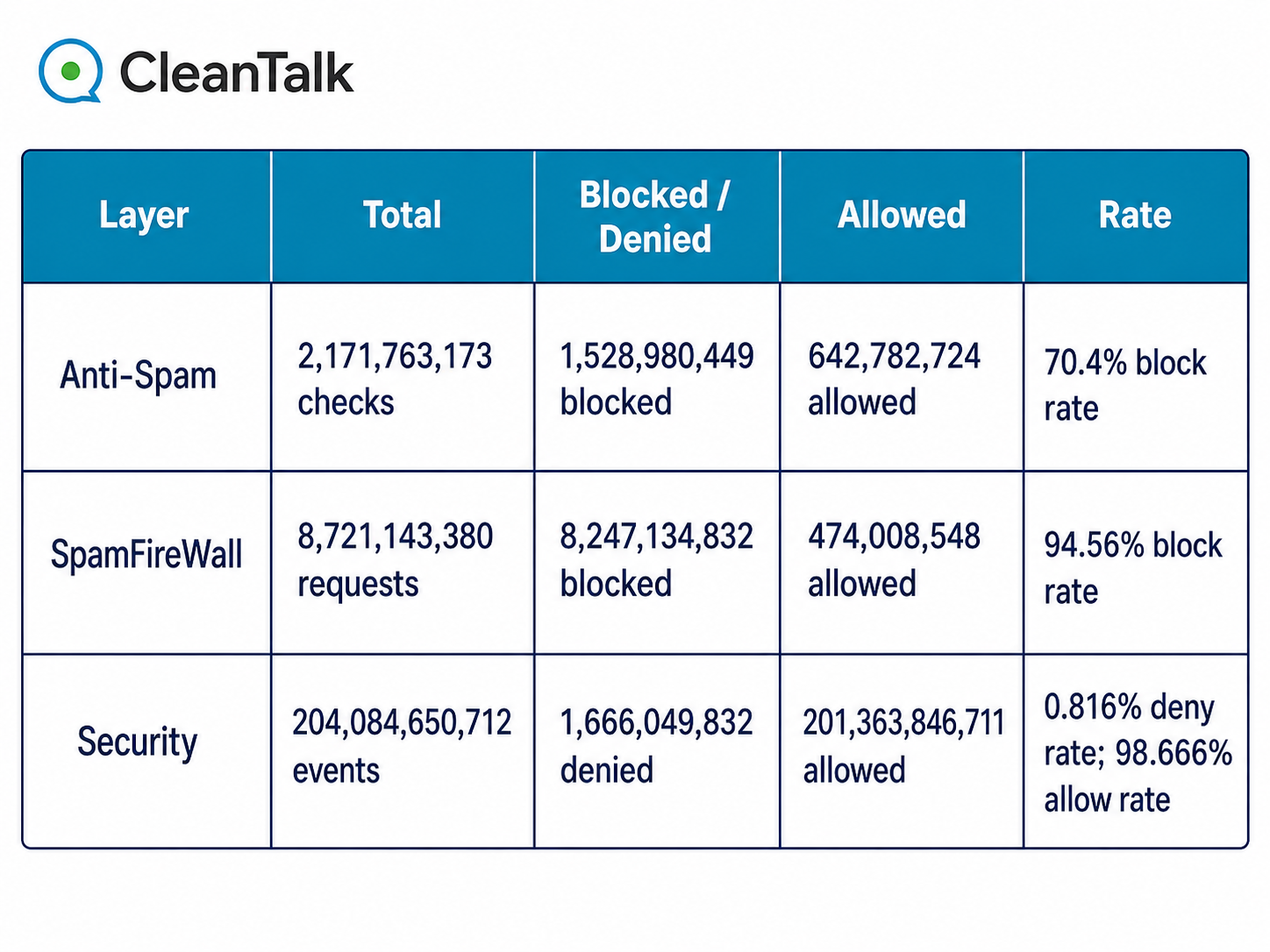
These numbers should not be summed into one combined total, because Anti-Spam checks, SpamFireWall requests, and Security events are different measurement layers. The value of the data is in showing the scale and role of each layer separately.
The strongest signal is SpamFireWall: it blocked 8.24 billion requests, with a 94.56% block rate. This supports the idea that a large part of spam and suspicious activity can be stopped before it reaches the visible website layer.
Why spam statistics matter
Most website owners only see the final result of spam: fake form submissions, fake users, spam comments, fake orders, or low-quality leads.
Behind these visible problems, there is usually a much larger volume of automated or suspicious requests. Spam statistics help turn this activity into measurable patterns.
- Where does spam-related traffic come from?
- How does spam activity change over time?
- Which protection layers block requests before they reach the website?
- Which CMS and community platforms appear in the spam dynamics data?
- Which website areas should owners monitor for visible spam problems?
This information is useful for website owners, developers, WordPress agencies, hosting providers, SaaS companies, e-commerce teams, and security professionals.
Why this report is useful
Spam statistics are useful when they are presented in a clear and structured way. Raw numbers can show the scale of spam activity, but a report helps website owners understand what these numbers mean in practice.
CleanTalk public spam statistics already include several important data points: spam sources by country, monthly activity across Anti-Spam, SpamFireWall and SecurityFireWall, POST request statistics, and CMS-level spam attack dynamics.
By organizing this data into a report and adding confirmed aggregated protection-layer totals, CleanTalk can make the statistics easier to read, cite, and use in practical website security decisions.
This report is based on CleanTalk public spam statistics and confirmed internal aggregated totals. It does not rely on third-party competitor reports.
Spam sources by country
CleanTalk statistics show that spam-related traffic is global, but not evenly distributed. Some countries and regions appear more often as sources of spam-related requests.
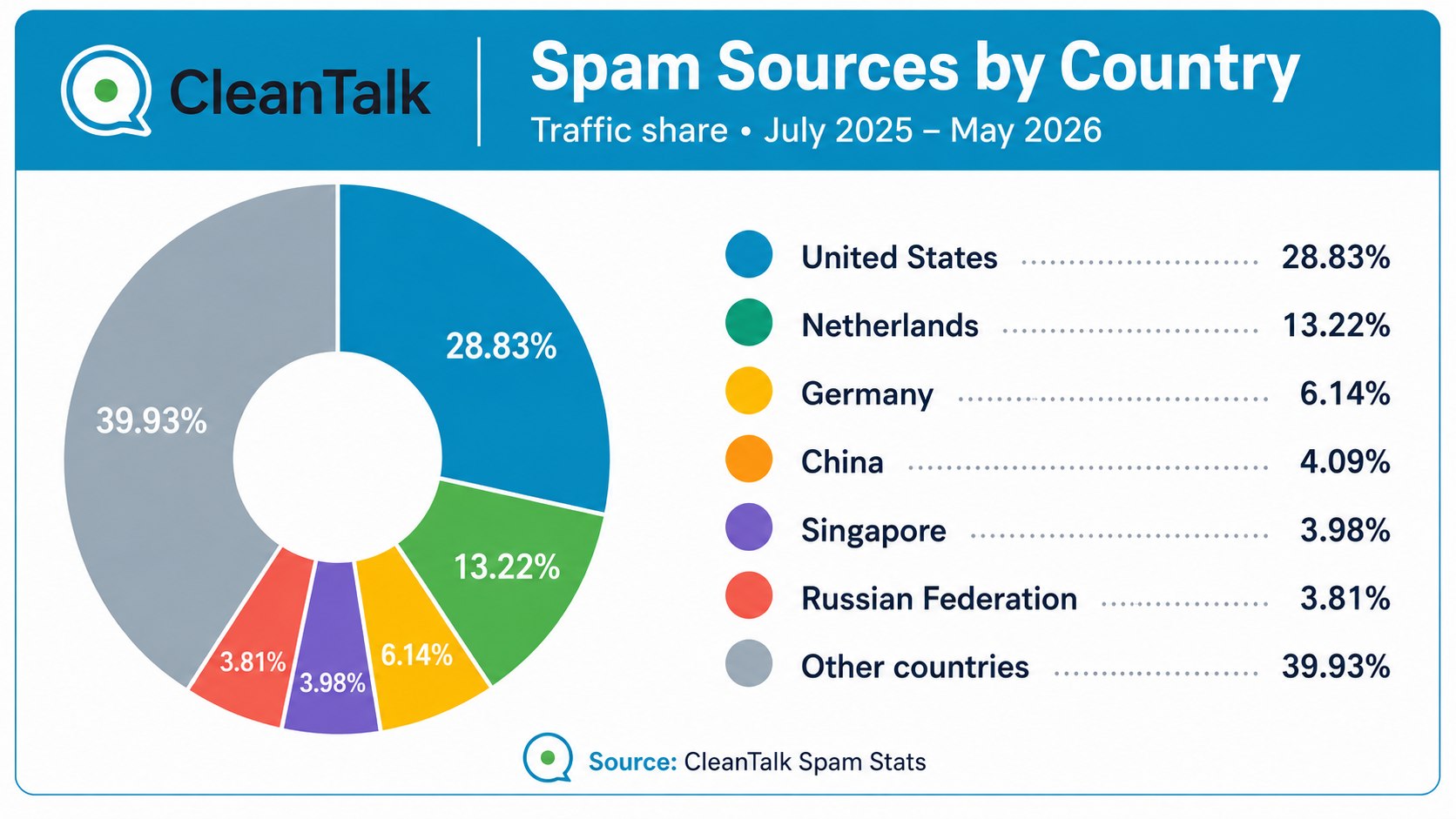
According to CleanTalk public spam statistics for July 2025 – May 2026, the top visible spam sources are:
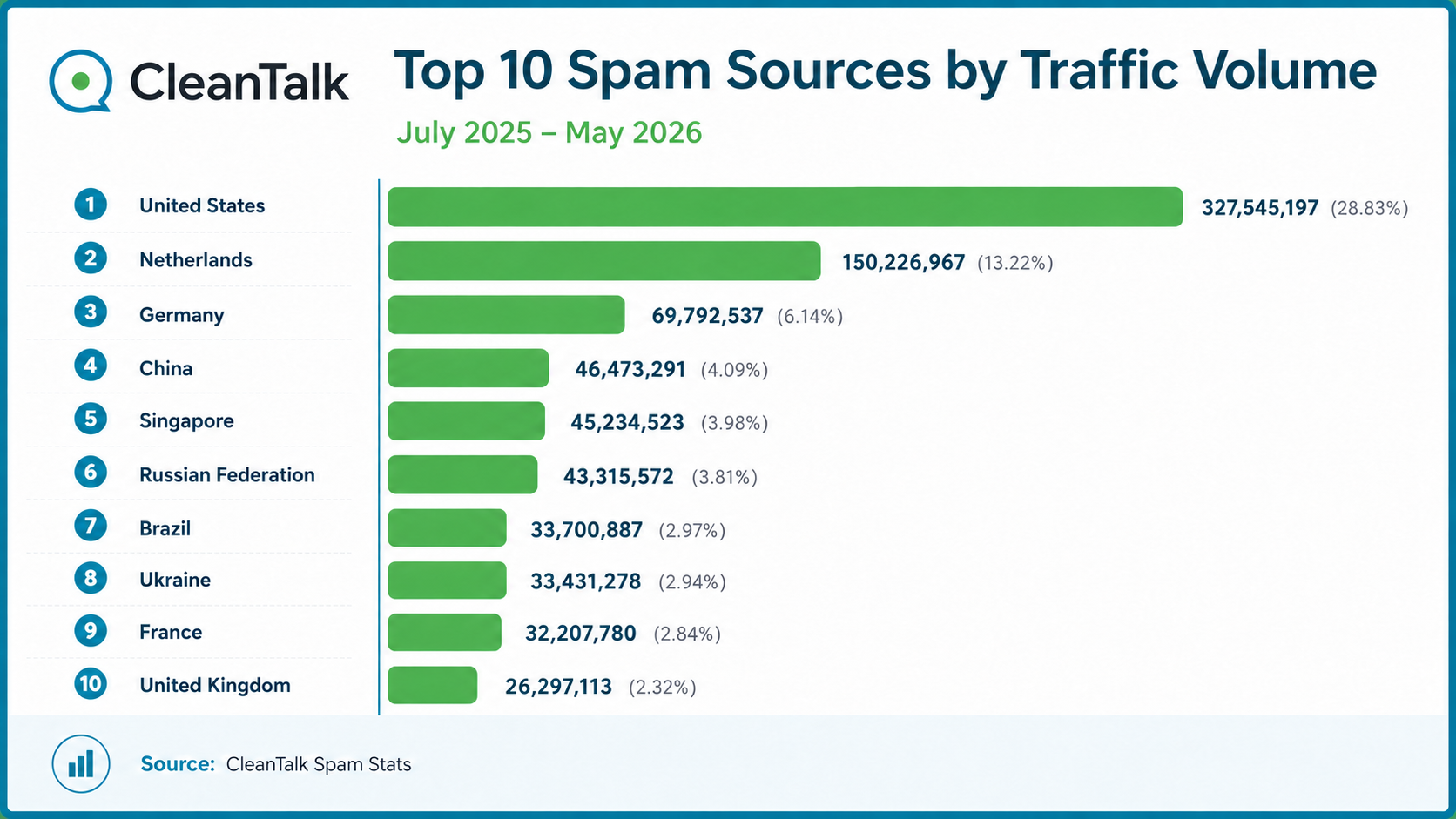
Country-level spam data should be interpreted carefully. A request from a specific country does not always mean the attacker is physically located there. Spam traffic can be routed through hosting providers, proxy networks, VPNs, cloud services, or compromised servers.
Still, this data is useful because it helps identify where spam-related traffic is coming from and how source patterns change over time.
Spam activity by protection layer
CleanTalk statistics separate activity across several protection layers, including Anti-Spam, SpamFireWall, and SecurityFireWall.
This is important because not all unwanted traffic reaches the same stage. Some requests can be blocked before they access a form. Others are checked during form submission. Some activity may be related to broader security filtering.
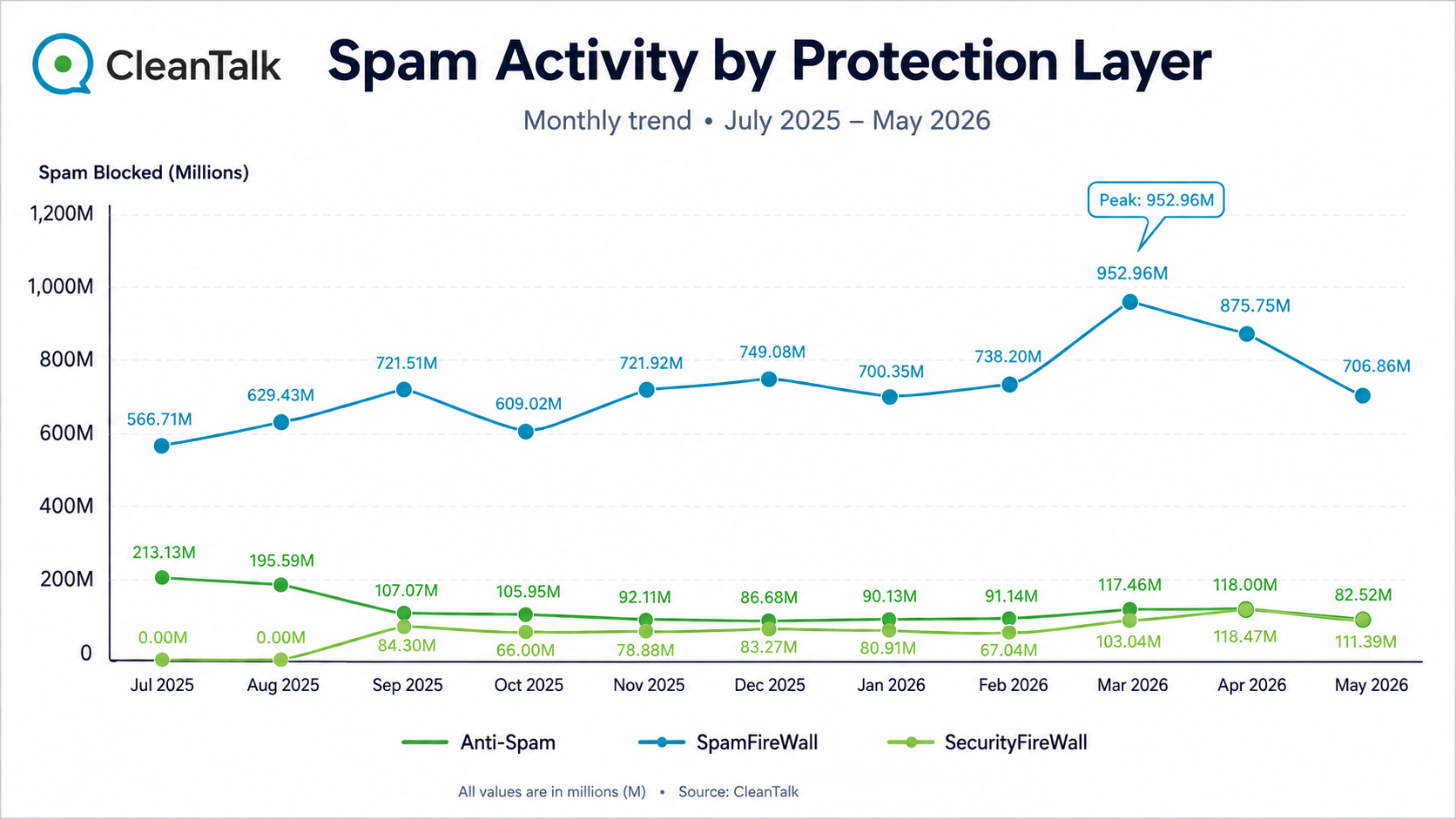
March and April 2026 peaks
In the visible monthly dataset, SpamFireWall shows especially high activity. For example, in March 2026, CleanTalk public statistics show:
- Anti-Spam - 117,457,775
- SpamFireWall - 952,963,719
- SecurityFireWall - 103,042,155
In April 2026, the visible data shows:
- Anti-Spam - 117,995,454
- SpamFireWall - 875,753,915
- SecurityFireWall - 118,472,006
These monthly values are consistent with the confirmed aggregated totals: SpamFireWall handles a large volume of requests and blocks the majority of them.
Why layered spam protection matters
Many website owners only think about anti-spam protection when they already see spam in their inbox, comments, admin panel, or CRM.
But by that point, the bot has already reached the website and submitted data. A layered approach helps block suspicious activity at different stages:
- before the bot reaches the form;
- during the request check;
- at the form submission stage;
- during registration or checkout validation;
- before spam data reaches email, CRM, analytics, or other business systems.
This helps reduce visible spam, server load, fake leads, fake orders, and low-quality analytics data.
Spam in POST requests
POST requests are important because they are used when users submit information to a website. Contact forms, registration forms, checkout forms, login forms, comment forms, booking forms, newsletter subscriptions, and API-based submissions often depend on POST requests.
CleanTalk public spam statistics include an annual view of spam in POST requests as a percentage of total requests. However, the current public page does not provide a stable tabular export by entry point or form type.
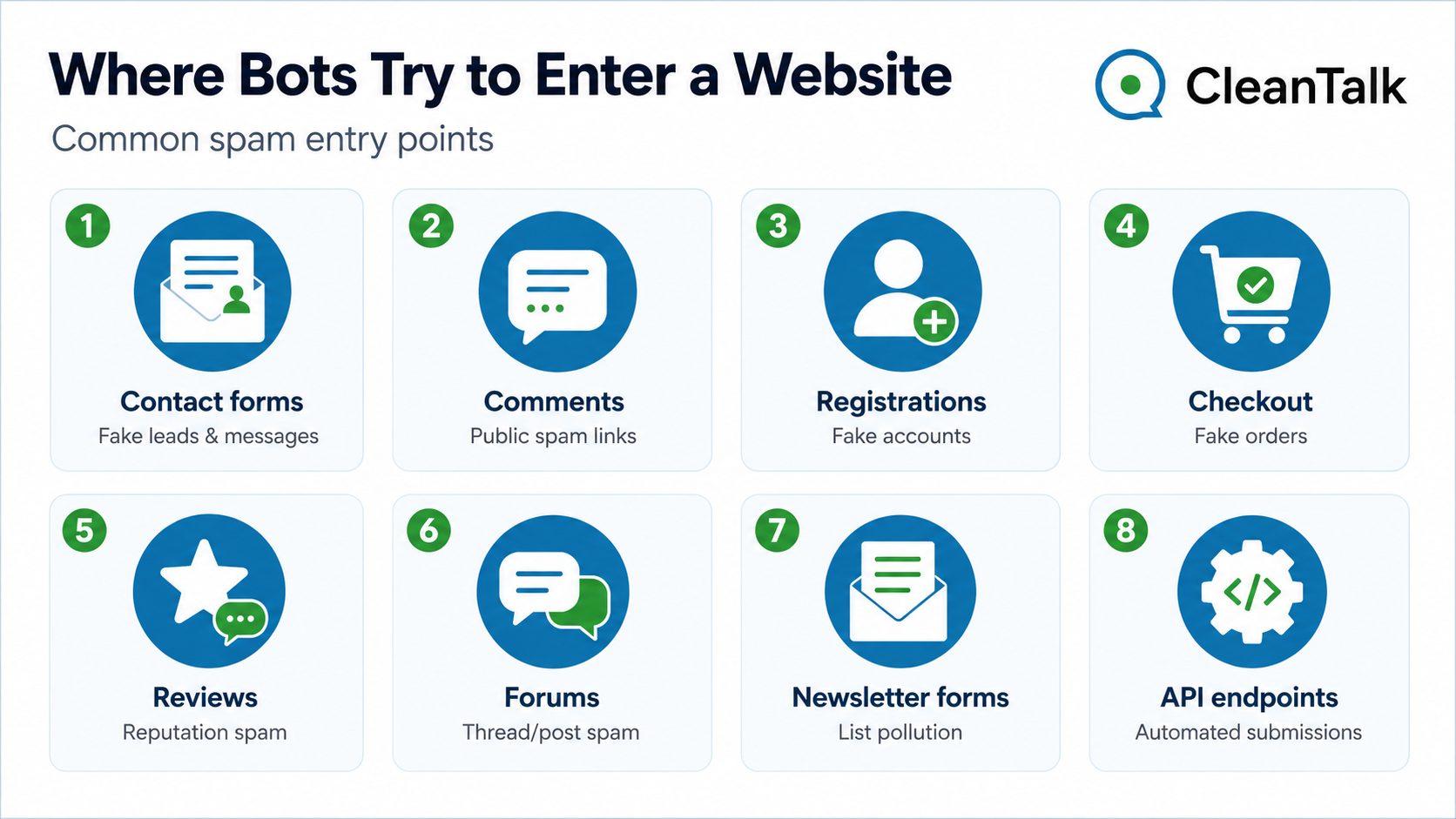
For this reason, this report does not claim an exact breakdown by contact forms, comments, registrations, checkout, reviews, newsletters, API requests, or forums. These are practical website areas where spam commonly appears, but they are not presented here as a quantified CleanTalk breakdown.
When bots abuse POST-based website actions, the result can include fake contact messages, spam comments, fake registrations, fake e-commerce orders, newsletter list pollution, forum spam, increased server load, and distorted conversion analytics.
CMS platforms affected by spam
CleanTalk public statistics show spam attack dynamics across many CMS and community platforms.
The public page includes separate spam attack dynamics reports for WordPress, Joomla, Drupal, Magento, OpenCart, phpBB, IP.Board, XenForo, vBulletin, Bitrix, PrestaShop, MediaWiki, MyBB, Craft CMS, Typo3, ModX Revolution, IPS Community Suite, and other platforms.
Spam activity is not limited to a specific CMS. It often follows available submission points rather than platform boundaries.
The current report does not include a detailed CMS breakdown by entry point, because that would require additional cross-referencing and is not available as a stable long-term export.
WordPress and website spam
WordPress is one of the platforms represented in CleanTalk’s CMS dynamics section, together with Joomla, Drupal, Magento, OpenCart, phpBB, XenForo, and others.
A WordPress site may include many user input points: comments, contact forms, login pages, registration forms, checkout forms, product reviews, newsletter forms, and plugin-generated forms. Each additional input point can create another place where spam may appear.
Because the current data does not include a confirmed WordPress-specific breakdown by form plugin, this report does not claim which WordPress form plugins are attacked most often.
For website owners, the practical takeaway is simple: anti-spam protection should cover the whole website, not only one visible form.
Why form spam is still one of the biggest website problems
Forms remain one of the easiest places for spam to become visible because they are designed to accept input from outside users.
A simple contact form can be abused to send mass messages. A registration form can be used to create fake accounts. A checkout form can generate fake orders. A newsletter form can pollute mailing lists. A review form can be used for reputation spam. A forum form can be used to publish links.
While the public statistics focus on spam sources, protection layers, POST requests, and CMS dynamics, the operational impact for website owners often appears in sales, support, analytics, e-commerce, and CRM workflows.
- sales teams waste time on fake leads;
- support teams miss real customer requests;
- CRM systems become polluted with bad data;
- analytics reports become less reliable;
- conversion rates become harder to interpret;
- server resources are used by bots instead of real users.
This is why spam protection should be seen not only as a security tool, but also as a data-quality and conversion-protection tool.
The problem with CAPTCHA-based spam protection
CAPTCHA is still widely used, but it creates a trade-off. It can help block some automated activity, but it can also add friction for real users.
Additional verification steps can make forms harder to complete, especially on mobile devices. Some users may abandon a form if they need to solve image puzzles, repeat verification, wait for scripts to load, or pass a challenge that does not work correctly.
CAPTCHA also does not solve every spam problem. Some spam operations may use CAPTCHA-solving services, browser automation, human-assisted farms, residential proxies, or more advanced request patterns.
For this reason, many websites need invisible, server-side spam protection that works in the background without asking every real visitor to prove they are human.
What website owners should monitor
Spam attacks often show warning signs before they become a major problem. Website owners should monitor both visible spam and unusual request behavior.
- a sudden increase in contact form submissions;
- many low-quality or irrelevant leads;
- fake e-commerce orders;
- fake user registrations;
- comment spam spikes;
- newsletter signups from suspicious emails;
- many submissions from the same IP range;
- repeated POST requests;
- traffic spikes from unexpected countries;
- higher server load without real user growth;
- unusual login or registration attempts.
These signals often indicate automated activity. The earlier they are detected, the easier it is to reduce damage.
How to reduce website spam
How CleanTalk helps protect websites from spam
CleanTalk provides anti-spam protection for websites without requiring users to solve CAPTCHA challenges. It helps check requests and block unwanted submissions across forms, comments, registrations, orders, and other website entry points.
For WordPress websites, CleanTalk supports a wide range of forms and plugins, making it useful for blogs, online stores, membership websites, communities, business websites, SaaS landing pages, and content projects.
The main benefit is that spam protection works in the background. Real users can submit forms normally, while suspicious activity is filtered before it pollutes website data.
Methodology
This report is based on publicly visible CleanTalk spam statistics from the CleanTalk spam statistics page and confirmed aggregated internal totals provided by the CleanTalk team for Anti-Spam, SpamFireWall, and Security layers.
The analyzed public data includes country-level spam source statistics, monthly activity across Anti-Spam, SpamFireWall, and SecurityFireWall layers, annual spam in POST requests, and CMS-level spam attack dynamics.
The confirmed aggregated totals include Anti-Spam checks, SpamFireWall requests, and Security events. These are different measurement layers and should not be combined into one overall number.
Detailed breakdowns by CMS entry point, website form type, WordPress-specific form plugin, or long-term day-by-day cross-reference are not included in this version, because those datasets are not available as a simple stable export and may require additional cross-referencing.
Country-level statistics should be interpreted as request-source data, not as confirmed attacker-location data. Spam traffic may be routed through hosting providers, proxy networks, VPNs, compromised servers, or cloud infrastructure.
FAQ
What is website spam?
Website spam is unwanted automated or manually submitted content sent through website entry points such as contact forms, comments, registrations, checkout pages, reviews, newsletter forms, or forums.
Why do bots spam contact forms?
Bots spam contact forms because forms are publicly accessible and easy to automate. They can be used to send links, promote services, test stolen data, create fake leads, or reach website owners directly.
Is spam only a WordPress problem?
No. WordPress is one of the platforms represented in CleanTalk’s CMS dynamics data, but spam affects many CMS platforms, forums, e-commerce systems, and custom websites.
Why do online stores get fake orders?
Online stores can receive fake orders when bots abuse checkout forms, test payment flows, submit fake customer data, or attempt fraud-related activity.
Is CAPTCHA enough to stop spam?
CAPTCHA can block some automated activity, but it is not a complete solution. Some bots can bypass or outsource CAPTCHA solving, while real users may abandon forms because of extra friction.
What is the best way to stop WordPress spam?
The best way is to protect all major entry points: comments, contact forms, registrations, checkout forms, reviews, newsletter forms, and custom forms. Protection should cover the whole website, not only one visible form.
Why is spam bad for analytics?
Spam can trigger fake conversions, fake registrations, fake orders, and fake form submissions. This makes marketing reports less reliable and can lead to wrong decisions about campaign performance and lead quality.
How can I know if my website is under a spam attack?
Warning signs include sudden increases in form submissions, many fake leads, repeated POST requests, fake registrations, fake online-store orders, comment spam spikes, suspicious countries in traffic reports, or unusual server load.
Conclusion
Spam attacks in 2025–2026 are not limited to comments or simple contact forms. They affect website security, analytics, lead quality, e-commerce operations, server resources, and user experience.
CleanTalk public spam statistics show that spam is global, multi-platform, and active across different CMS environments. The largest visible spam sources include the United States, the Netherlands, Germany, China, Singapore, the Russian Federation, Brazil, Ukraine, France, and the United Kingdom.
Confirmed aggregated totals add more context: Anti-Spam blocked 1.52 billion checks, SpamFireWall blocked 8.24 billion requests, and the Security layer processed more than 204 billion events.
At the CMS level, spam activity appears across WordPress, Joomla, Drupal, Magento, OpenCart, phpBB, IP.Board, XenForo, PrestaShop, Bitrix, and other platforms.
For website owners, the conclusion is clear: spam protection should be treated as part of the core website security setup, not as an optional add-on.
Protect your website from spam without CAPTCHA
CleanTalk helps protect forms, comments, registrations, orders, and other website submissions in the background - without forcing real users through visible challenges.
Explore CleanTalk Anti-Spam