How to Check User Passwords for Information Leaks
With the alarming rise of leaked password databases available on the dark web, ensuring your users' accounts aren't compromised is critical. The CleanTalk Security plugin offers a built-in feature that continuously monitors user passwords for potential exposure in known data breaches, protecting your WordPress site from unauthorized access.
How It Works
This feature operates seamlessly in the background as a proactive security measure:
- The plugin automatically cross-checks all user passwords against a regularly updated list of compromised credentials.
- The process is fully automated and requires no action from your users unless a specific leak is detected.
- If a password match is found in a data breach database, the plugin immediately alerts the administrator and recommends a password reset for the affected account.
How to Enable the Option
Go to WordPress Administration Dashboard → Settings → Security by CleanTalk → General Settings → Enable the option "Checking the user`s password for information leaks" → Save Changes
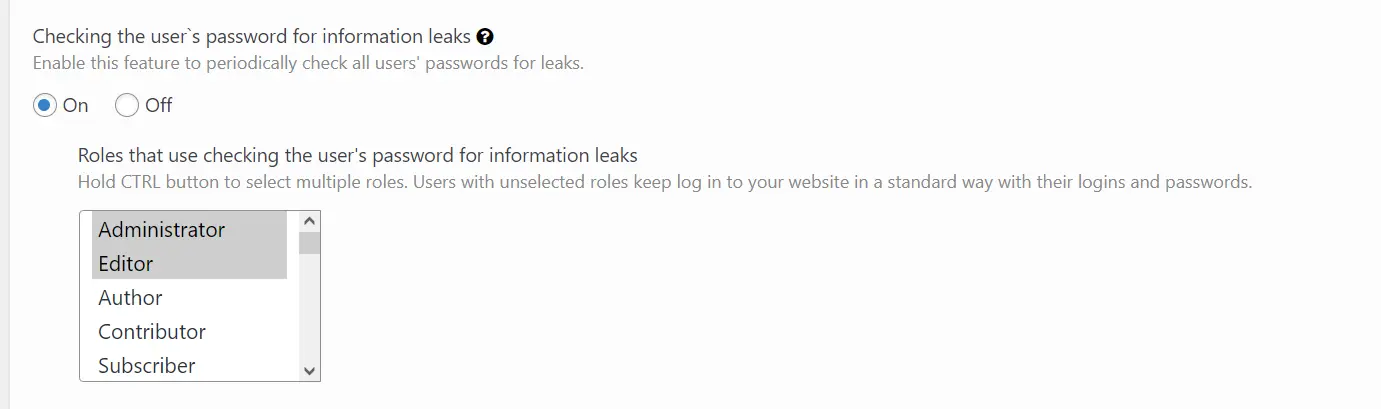
Additionally, you can choose the roles that will be checked.
What to Do When a Leak is Detected
If CleanTalk detects that a user's password has been exposed:
- Check the plugin notification to identify the affected user account.
- Initiate a mandatory password reset for that specific user within your WordPress user management dashboard.
- Within the next login, a user with a compromised password will also be forced to change their password.
It would also be interesting
- Restore Access to the CleanTalk Anti-Spam DashboardHow to Restore Access to My Dashboard? If you forgot or lost your password or e-mail to your CleanTalk...
Copied to clipboard