How to Get Access to the CleanTalk Block Lists Service
CleanTalk provides a unique database of IP and email activity built from real-world abuse reports collected across blogs, forums, e-commerce stores, and corporate sites. Gathering data globally, our system processes millions of spam and security reports every month to maintain real-time threat intelligence.
The CleanTalk Block Lists requires a separate license. If you would like to use it, please purchase a Block Lists License from your billing page here.
You can check the detailed pricing and available plans for the Block Lists here.
- Go to your CleanTalk Dashboard.
- Click the "Services" menu and select the "Block Lists" item.
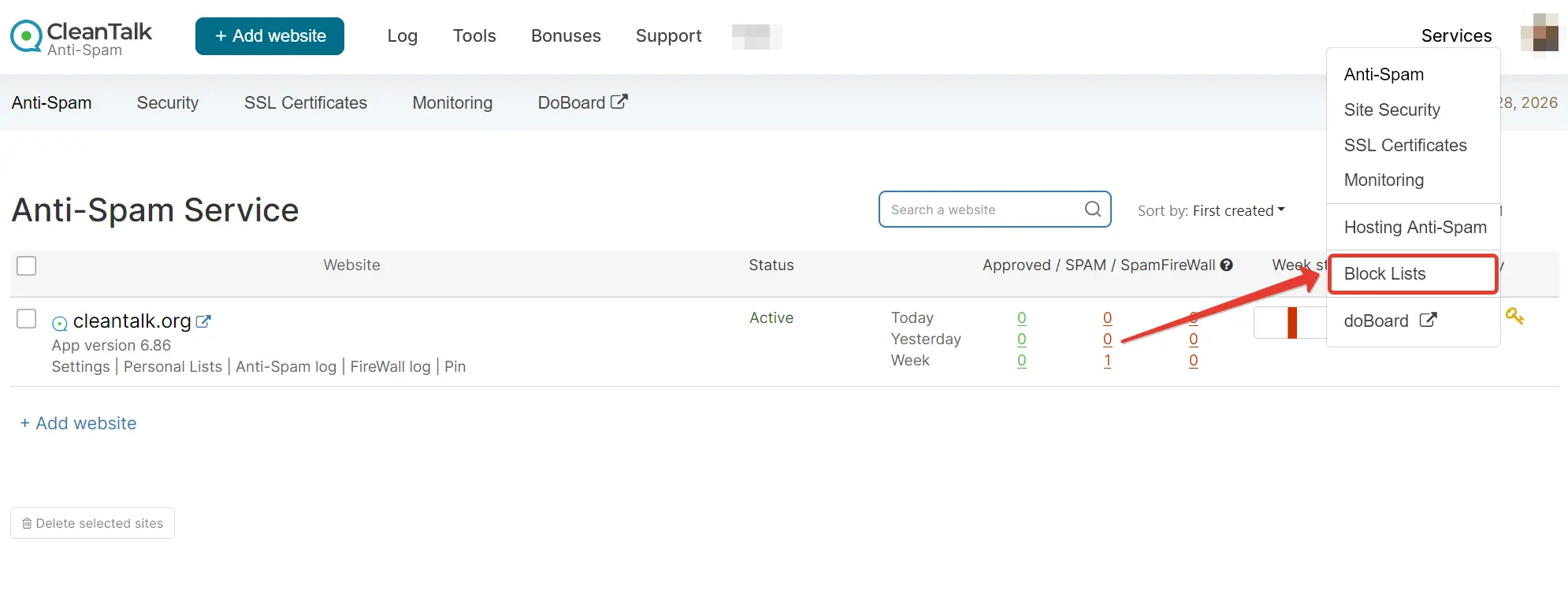
There are 4 ways to access the CleanTalk Black Lists:
- CleanTalk APIs — https://cleantalk.org/my/?cp_mode=api#api_methods
- Online Search — https://cleantalk.org/my/?cp_mode=api#online_search
- Offline Files — https://cleantalk.org/my/?cp_mode=api#offline_files
- DNSBL — https://cleantalk.org/my/?cp_mode=api#dnsbl
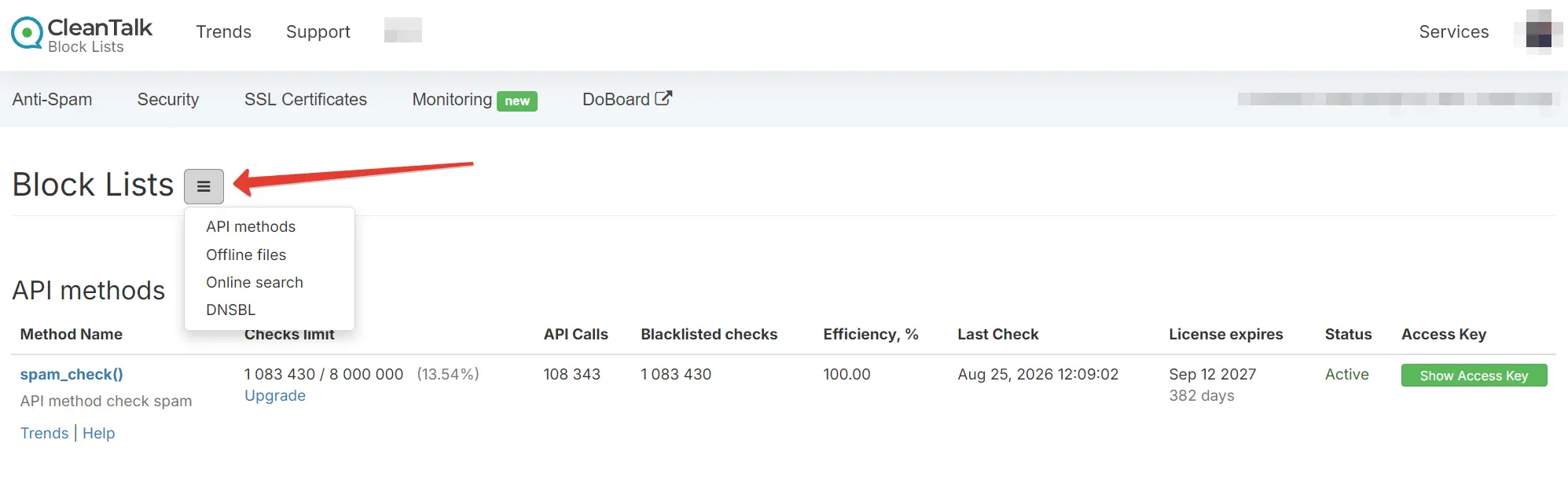
The Block Lists Dashboard Elements
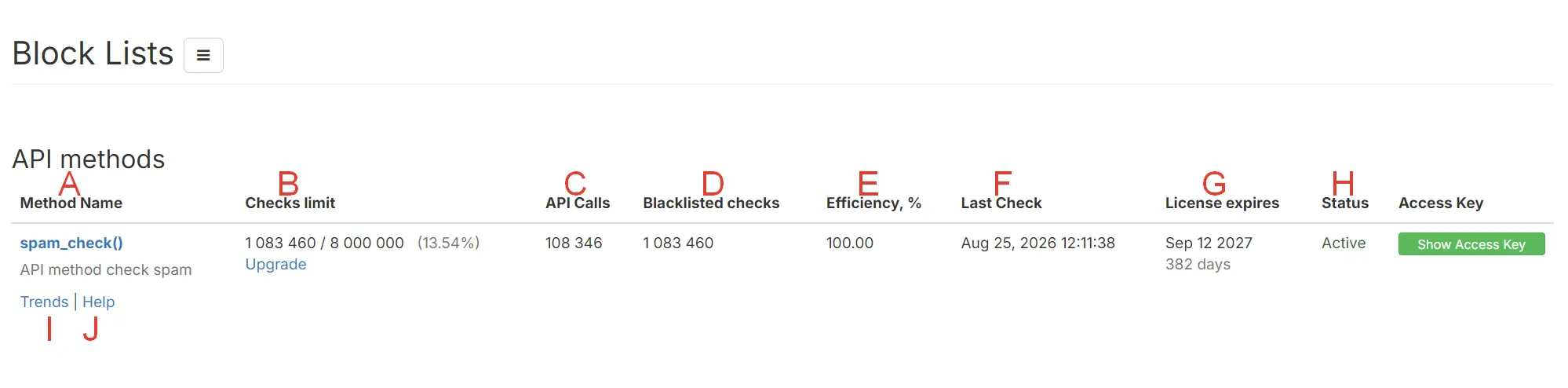

A – Name of the API method: Displays the specific API method name (e.g., spam_check).
B – Number of used/paid checks: Shows the consumed vs. available lookup quota (note: 1 check can cover multiple API calls depending on parameters).
C – Number of API Calls: The total count of raw requests transmitted to the API server.
D – Number of checks: Total count of individual IP/email reputation queries processed.
E – API method efficiency: Measures overall accuracy and success metrics for API check requests.
F – Date and time of the last check: Timestamp marking the most recent API query.
G – The license expiration date: Shows when the current API service license expires.
H – Current API method status: Indicates whether the API service is currently active or limited.
I – Detailed API Analytics: Link to view extended usage graphs and historical trends.
J – API Method "spam_check" complete guide: Direct documentation link explaining integration for the spam_check() method.
Online Search Section
K – Create a new search: Input control that lets you manually look up an IP or email address directly in the web browser.
L – Date of the last Online Search check: Timestamp showing when the most recent manual online query was executed.

M – Your personal credentials to get access to the offline CleanTalk Database: Displays your unique SFTP login and password required to connect to the CleanTalk server and download database files directly.
N – Date and time of the last CleanTalk Database update: Shows the exact timestamp when the offline threat database files were last regenerated (updated hourly).
O – Package content according to your active license: Details the level of data included in your plan based on spam frequency thresholds (e.g., Level 1–4, active IP counts, and email counts).
P – Status of your access to the offline CleanTalk Database: Indicates whether your subscription is active, allowing file downloads via SFTP, or suspended/expired.
Q – Make login and password data visible: A toggle button to reveal or mask your SFTP credentials on the screen for security purposes.

R – Host name: Displays your personal DNSBL server endpoint.
S – DNSBL Package content: Details the volume of queries, query rate limits, or threat-level tiers included in your current DNSBL subscription package.
T – Status of your access to the CleanTalk Database via DNSBL: Shows whether your DNSBL query access is currently active or suspended
CleanTalk APIs
The following API methods are available for your Block Lists License:
- spam_check — You can find the full integration guide here.
- backlinks_check — You can find the full integration guide here.
Online Search
Please follow this guide to check lists of IPs and email addresses in bulk:
Offline Database
Here you can access your personal credentials to download the CleanTalk Black Lists Database via SFTP (supported formats include CSV and IPSET).
Database records update every hour. The license is issued solely to the account holder and cannot be transferred to third parties.
Data from the CleanTalk Service may not be published or redistributed without prior written permission.
Click the "Show credentials" link to view your login and password details.
DNSBL
To perform IP checks via DNS records, please refer to our DNSBL integration guide here.
Couldn't find what you were looking for? Reach out to our technical support team here: https://cleantalk.org/my/support/open
It would also be interesting
- How to Remove Anti-Spam & Security Plugins or Reset Their DataHow to Remove Anti-Spam & Security Plugins or Reset Their Data Sometimes a plugin may glitch...
- IP or E-mail Deletion From CleanTalk Block List Public PageHow to Delete Your IP or Email Address From the CleanTalk Blacklist Public Page? Find your IP...
- CleanTalk API methods. Anti-Spam, Block Lists, Dashboard (Outdated)CleanTalk APIs This guide is outdated! Please use this instead https://cleantalk.org/help/api-main CleanTalk...
