How to Install the CleanTalk Anti-Spam Plugin in Joomla 1.5
Important: The official support of the Anti-Spam plugin for Joomla 1.5 has ended. This legacy version of the CleanTalk plugin is no longer maintained, meaning no further updates, bug fixes, or new features will be released for it. If you are running Joomla 3.x or higher, please install the updated version of the Anti-Spam plugin from here
Anti-Spam plugin for Joomla 1.5 features
Common:
- Keep Anti-Spam logs for 45 days
- Blocking visitors by country
- Blocking by stop-words
- Blocking by language
- Custom server response
- Form Validation Notice
- Additional email address for notifications about spam events
- Delegating access to the CleanTalk Control Panel
- Anti-Spam Event Log
- Checking email for existence
- Filtering disposable emails
- Notifications about filtering events on the site
Anti-Spam:
- Personal black and white lists for Anti-Spam service
- Check existing users and comments for spam
- Manage spam comments
- Protection of contact forms, registration forms, comments
- RSForms Protection
- JComments Protection
SpamFireWall Option:
- Personal SpamFireWall Black & White Lists
Installation Guide
1. Make a backup of the site files and database!
2. Download the plugin.
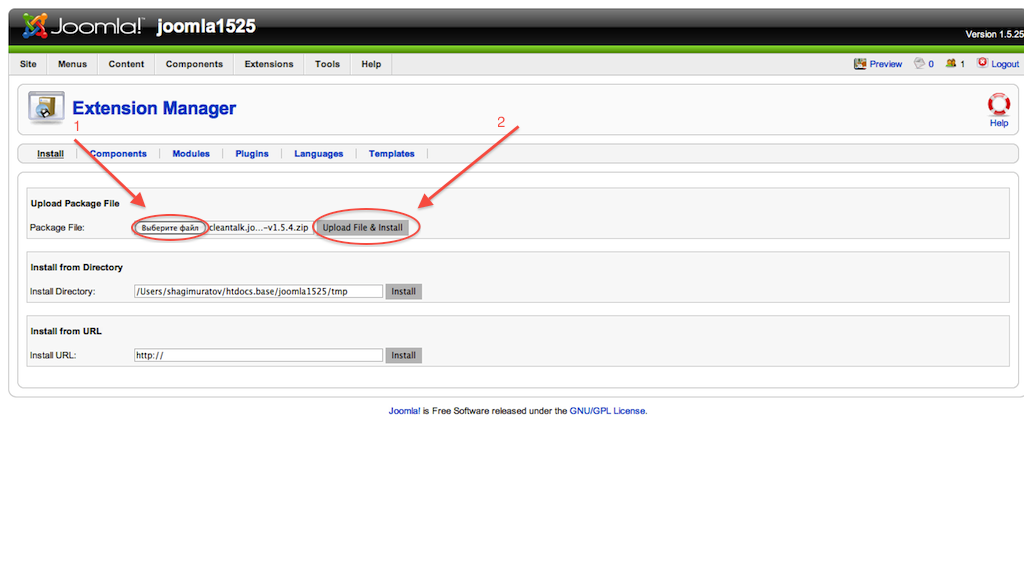


If you have installed JComments please look for the instructions below.


How to Add a Website to CleanTalk Anti-Spam Dashboard
Please, use this guide to add a website to CleanTalk Anti-Spam Dashboard: https://cleantalk.org/help/add-website
Congratulations. The Anti-Spam is installed!
If you haven't found the answer to your question, please, contact our support team:
https://cleantalk.org/my/support/open
It would also be interesting
- How to install CleanTalk Anti-Spam on Joomla 2.5CleanTalk Anti-Spam set up on Joomla 2.5 Important: Since official support for Joomla 2.5 has...
- How to Update the CleanTalk Anti-Spam Plugin for Joomla 3.x – 6.xHow to Update the CleanTalk Anti-Spam Plugin for Joomla 3.x – 6.x How to Update the CleanTalk...
- Updating the CleanTalk Anti-Spam Plugin on Joomla 2.x ManuallyJoomla 2.x: How to Update the CleanTalk Anti-Spam Plugin Manually Text version Go to Joomla Administrator...