CleanTalk Anti-Spam set up on Joomla 2.5
Important: The official support of the Anti-Spam plugin for Joomla 2.5 has ended. This legacy version of the CleanTalk plugin is no longer maintained, meaning no further updates, bug fixes, or new features will be released for it. If you are running Joomla 3 or higher, please install the updated version of the Anti-Spam plugin from here:
Anti-Spam plugin for Joomla 2.5
Common:
- Keep Anti-Spam logs for 45 days
- Blocking visitors by country
- Blocking by stop-words
- Blocking by language
- Custom server response
- Form Validation Notice
- Additional email address for notifications about spam events
- Delegating access to the CleanTalk Dashboard
- Anti-Spam Event Log
- Checking email for existence
- Filtering disposable emails
- Notifications about filtering events on the site
Anti-Spam:
- Personal black and white lists for Anti-Spam service
- Check existing users and comments for spam
- Manage spam comments
- Protection of contact forms, registration forms, comments
- RSForms Protection
- JComments Protection
SpamFireWall Option:
- Personal SpamFireWall Black & White Lists
Installation Guide
Go to your Anti-Spam Dashboard
- Make a backup of the site files and database!
- Download the plugin.
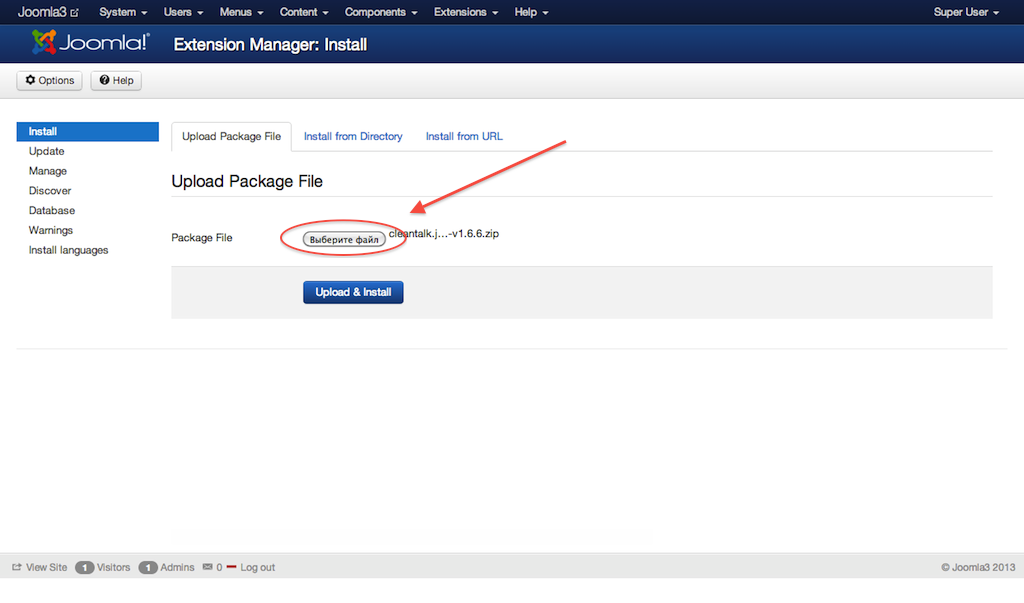
- Select archive with plugin and run installation in the menu Extensions -> Install / Uninstall
Go to plugin settings: Extensions -> Plugin Manager -> Anti-Spam by CleanTalk. In plugin settings press "Get access key automatically" button. Admin email will be used for registration.
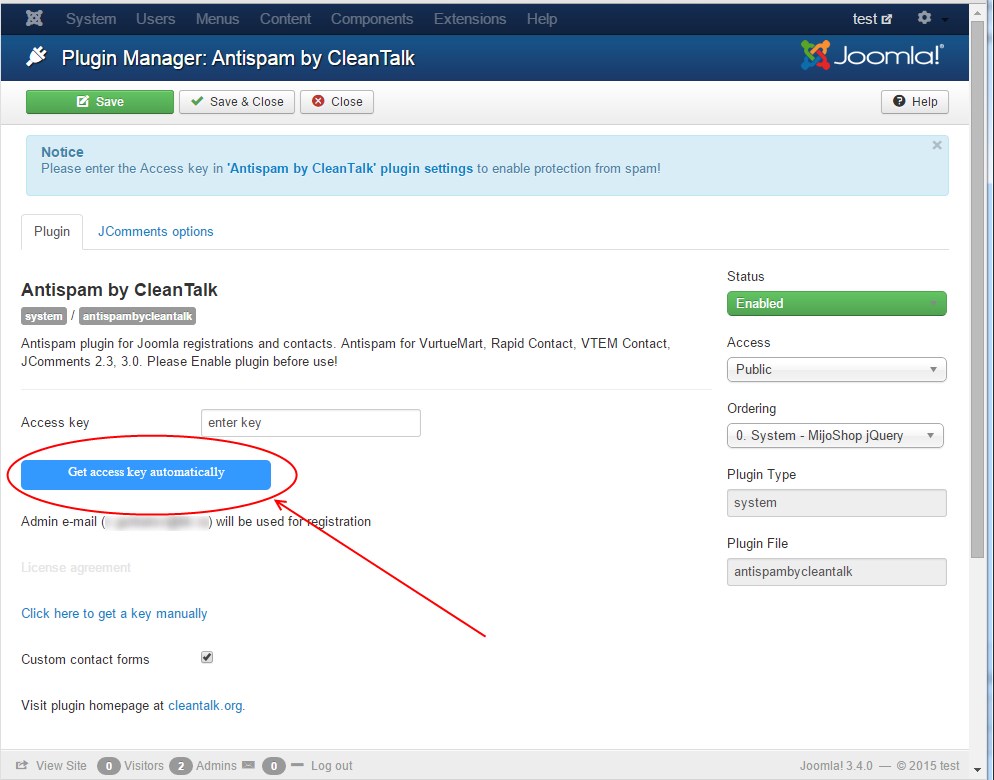
If an error occurs, click the link to get a key manually. Fill in the easy registration form and you will receive your key.

Enter key in its field, save settings.

Write a dummy comment, dummy registration, or dummy contact message with email stop_email@example.com. You should see the plugin respond, like in the screenshot.


To test if SpamFireWall is working just add /?sfw_test_ip=10.10.10.10 to your site name. Example www.yoursitename.domain/?sfw_test_ip=10.10.10.10 (you must see blocking screen)
Attention! You should test SFW with incognito mode switched on. To enable incognito mode press Ctrl+Shift+N for Chrome, Opera and Safari browsers; press Ctrl+Shift+P for Firefox, Internet Explorer and Microsoft Edge.
Exclusions for some pages of sites
Open the file "custom_config.php" from directory /plugins/system/antispambycleantalk
There are lines:
Exclusion for URL:
// Exclude urls from spam_check. List them separated by commas
private $cleantalk_url_exclusions = '';
Exclusion for fields:
//Excludes fields from filtering. List them separated by commas
private $cleantalk_fields_exclusions = '';
For example: If you need to except these URLs:
- example.com/some/thing
- example.com/some/one
- example.com/some/body
You should add this:
private $cleantalk_url_exclusions = 'some';
Make note, that you can add multiple URLs separated by commas:
private $cleantalk_url_exclusions = 'Url1','Url2','Url3';
How to Add Website to CleanTalk Anti-Spam Dashboard
Please, use this guide to add a website to CleanTalk Anti-Spam Dashboard: https://cleantalk.org/help/add-website
Congratulations. Anti-Spam is installed!
Couldn't find what you were looking for? Contact our technical support team for assistance.
It would also be interesting
- CleanTalk Anti-Spam Setup on Joomla 1.5How to Install the CleanTalk Anti-Spam Plugin in Joomla 1.5 Important: The official support...
- How to Update the CleanTalk Anti-Spam Plugin for Joomla 3.x – 6.xHow to Update the CleanTalk Anti-Spam Plugin for Joomla 3.x – 6.x How to Update the CleanTalk...
- Updating the CleanTalk Anti-Spam Plugin on Joomla 2.x ManuallyJoomla 2.x: How to Update the CleanTalk Anti-Spam Plugin Manually Text version Go to Joomla Administrator...