CleanTalk Anti-Flood and Anti-Crawler Options
CleanTalk SpamFireWall
SpamFireWall (SFW) is an additional option and part of the CleanTalk Anti-Spam plugin that blocks access to the website with most spam active IP addresses (blocks GET requests). Spambots are blocked by the website FireWall before they get access to the website. It prevents spam bots from loading pages on a website, so your web server doesn't need to run all the scripts on these pages. This can reduce the load on the database and web server.
If Varnish is used on your server, then the SFW may affect the site loading speed; in this case, you need to disable SFW in the settings of the plugin.
Anti-Flood and Anti-Crawler are additional options of SpamFireWall that are designed to block unwanted bots that can search vulnerabilities on a website, attempt to hack a site, collect personal data, price parsing or content and images, generate 404 error pages, or aggressive website scanning bots. Aggressive website scanning bots can load website servers a lot; therefore, the speed of websites can go down as well. As a result, the Google Ranking System will lower the website's position.
Learn more about what problems bad bots can cause on your site on our Blog.
If you need to allow access for any bots that are not in the exceptions, you can use your own white lists, allowing any IP to visit your website.
More information about white lists is here: Setting Up a Blacklist in the SpamFireWall Option.
How to manage your Private list by User-Agents: Filtration by User-Agents in the Anti-Crawler Option.
You can see more details about CleanTalk SpamFireWall in this article.
CleanTalk Anti-Crawler
The initial visit of your website by any IP triggers a bot check. If the check fails, the Anti-Crawler blocking screen will be displayed to the visitor the next time the website page is loaded. A bot will not be able to pass the check and leave the blocking page. A regular visitor will be redirected to the website after 3 seconds.
If the check passes, the blocking screen will no longer be presented to the visitor (unless they change their browser or device, or go incognito/private browser mode).
If the check fails, the blocking screen will be given on all further requests until the check passes. If there have been no requests from this visitor for 24 hours, the visitor's information is cleared and the next request will be processed again according to the general rules.
If you have any issues with false positives, then you need to disable the Anti-Crawler option. These issues may be related to caching on the website. Sometimes it may help to set the "Cookie settings" option to "Auto" or an alternative mode. In some cases, it may help to switch the "Add CleanTalk pixel to improve IP detection" option to "Via JavaScript."
This option has a list of exceptions so as not to block requests from bots like Google, Bing, Baidu bots and etc.
You can see the full list of trusted bots on the help page: Filtration by User-Agents in the Anti-Crawler Option. These bots are whitelisted by default, but you can change their status for your site and block selected bots.
Anti-Crawler can be disabled for the feature WordPress Feeds (pages will be excluded from checking for spam): Website Requests Can Be Excluded From the Option Anti-Crawler.
To enable the option: WordPress Dashboard → Settings → Antispam by Cleantalk → Advanced settings → Anti-Crawler.
CleanTalk Anti-Flood
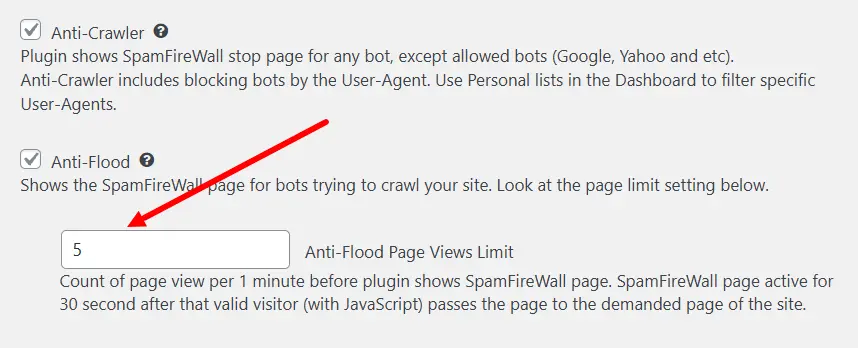
This option is meant to block aggressive bots. You can set the maximum number of website pages your visitors can click on within 1 minute. If any IP exceeds the set number it will get the CleanTalk blocking screen for 30 seconds. It's impossible for the IP to open any website pages while the 30-second timer takes place. When the timer ends the IP will be able to continue visiting your pages and the Anti-Flood option starts counting the number of page visits again.
For example, if you set the Pages Views Limit to 20. That means that any visitor who opens 20 website pages within 1 minute will be blocked for 30 seconds and they will not be able to see your website during that time.
This option has a list of exceptions so as not to block requests from bots like Google, Bing, Baidu bots and etc.
You can see the full list on the help page: Filtration by User-Agents in the Anti-Crawler Option. These bots are whitelisted by default, but you can change their status for your site and block selected bots.
To enable the option: WordPress Dashboard → Settings → Antispam by CleanTalk → Advanced settings → Anti-Flood
Statistics
Statistics of blocks for the options Anti-Flood и Anti-Crawler is available in the SpamFireWall Log.
Couldn't find what you were looking for? Contact our technical support team for assistance.
It would also be interesting
- User-Agent Filtration with Anti-CrawlerFiltration by User-Agents in the Anti-Crawler Option The Anti-Spam plugin for WordPress allows...
- Block Bot Traffic and Bad Bots on Your Website.ct-bbt-page, .ct-bbt-page p, .ct-bbt-page li { line-height: 1.6; font-family: system-ui,...
- CleanTalk Anti-Flood and Anti-Crawler – WordPress Bot Protection PluginStop Bad Bots from Slowing Down Your Website Bad bots can quietly eat up your server power, slow down...