Filtration by User-Agents in the Anti-Crawler Option
The Anti-Spam plugin for WordPress allows you to filter bot access to your site by User-Agent. To enable this feature, open your Anti-Spam plugin settings:
WordPress Dashboard → Settings → Anti-Spam by CleanTalk → Advanced settings
And enable the SpamFireWall and Anti-Crawler options:
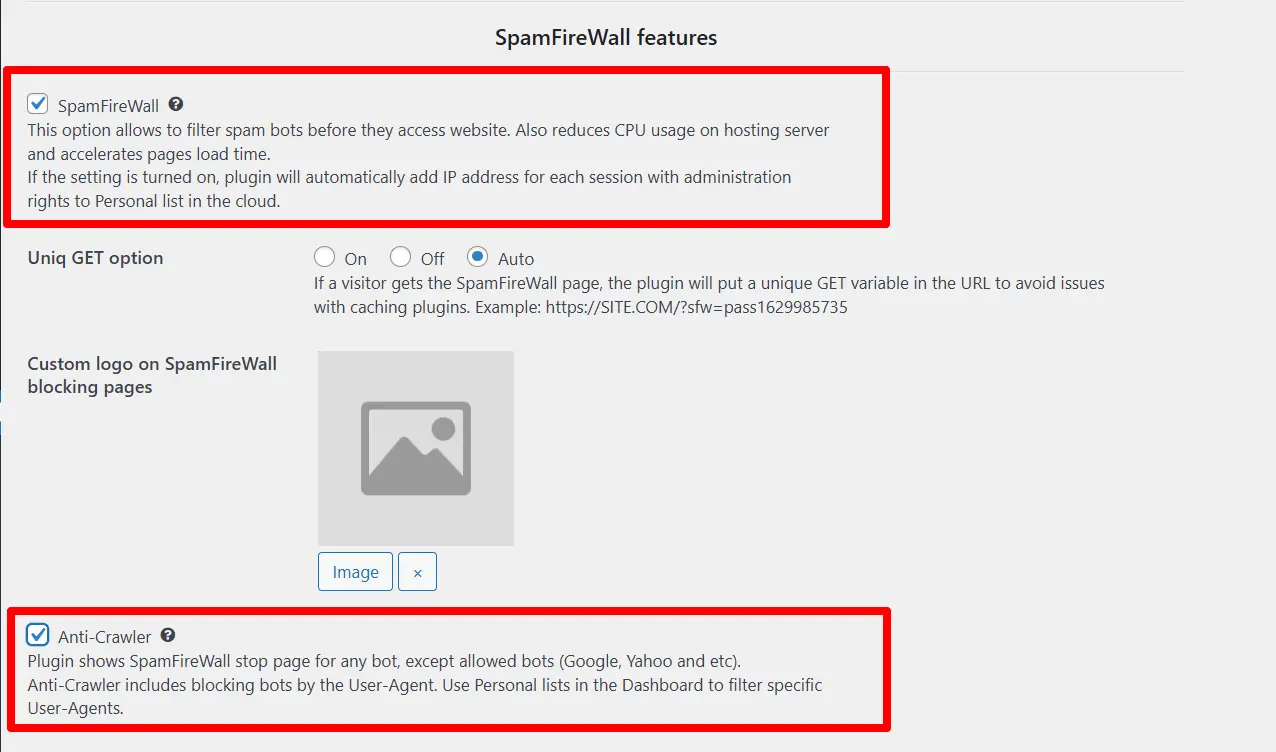
You can learn about how these options work here: CleanTalk Anti-Flood and Anti-Crawler Options.
There is a comprehensive list of trusted User-Agents in our service, whose requests will not be blocked by Anti-Crawler. If you want to block access to the site for any of them, you can add them to your personal blocklists.
To do this, click "Add New Filter" on the SpamFireWall personal lists page and select the User-Agent type. Then select an user-agent from the drop-down list and block it:
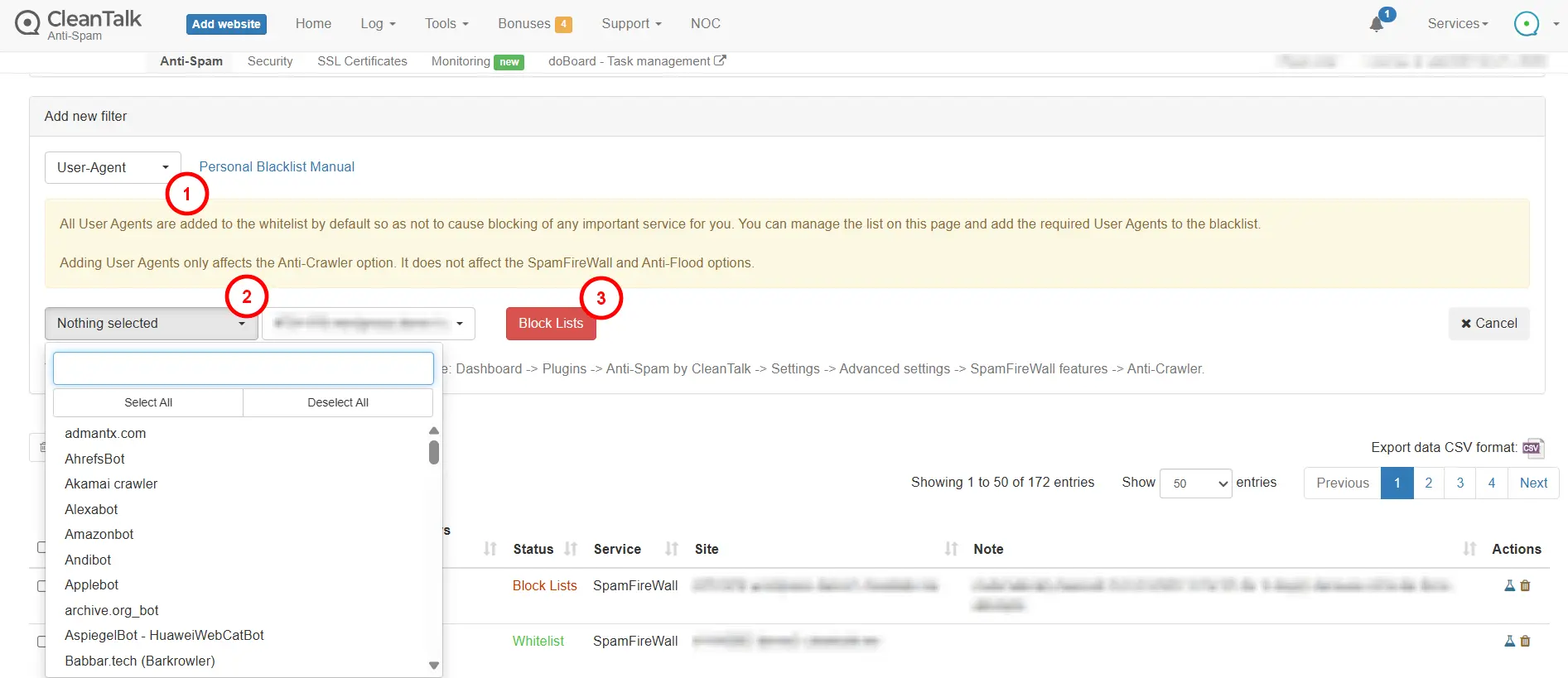
The information should be automatically transferred to the plugin within a few minutes. If this doesn't happen within 20 minutes, please go to the plugin settings and click "Synchronize with the Cloud." In any case, the plugin synchronizes its databases itself once every 24 hours.
Now all requests with a prohibited User-agent will be blocked from the first visit to the site.
List of all available User-Agents (spoiler)
- admantx.com
- AhrefsBot
- Akamai crawler
- Alexabot
- Amazonbot
- Andibot
- Applebot
- archive.org
- AspiegelBot - HuaweiWebCatBot
- Babbar.tech (Barkrowler)
- Baidu
- Better Uptime Bot
- Bing
- Bravebot
- BrightLocalBot
- Bytespider
- CCBot
- ChatGPT-User
- ClaudeBot
- CleanTalk
- CloudFlare crawler
- CookieYesbot
- DotBot
- DuckDuckGo
- Ezoic
- FacebookBot
- FeedBurner
- Feedly Fetcher
- FlyingPress
- FreshpingBot
- Google Storebot
- GPTBot
- Grapeshot
- GTmetrix
- GumGum-Bot
- HuaweiWebCatBot
- Hypefactors
- Jetpack Site Uptime Monitor
- KomoBot
- Lighthouse
- LinkedInBot
- Magpie Crawler
- Mail.ru
- MailChimp
- Mailerlite
- Majestic MJ12bot
- Mastodon
- Meetedgar.com
- meta-externalads
- meta-externalagent
- meta-externalfetcher
- meta-webindexer
- MirrorWeb
- MyWebsiteIsOnline-Monitor
- Neevabot
- OAI-SearchBot (OpenAI)
- PerplexityBot
- Petalbot
- PhindBot
- Pingdom.com bot
- Pinterest bot
- Printful WooCommerce Integration
- proximic
- PulsePoint Healthcare
- QUIC.cloud
- Qwant Web crawler
- Rambler bot
- RankMathApi
- RapidLoad (rapidload.io)
- Rogerbot - MOZ.com
- Screaming Frog SEO Spider
- SeekportBot
- Semrush
- SEOkicks-Robot
- serpstatbot
- Seznam
- ShipStation
- ShortPixel Image Optimizer
- Site24x7
- Sitechecker
- SiteGuruCrawler
- sogou spider
- StatusCake
- Sucuri Uptime Monitor
- TikTokSpider
- Uptime-Kuma
- UptimeRobot.com
- WaldoBot
- Wikipedia crawler
- WooCommerce API
- wordoftravel: Find Travel Blogs and Explore Destinations
- WP Engine Smart Plugin Manager
- WP Fastest Cache Preload Bot
- WP Rocket
- WPCompress
- Yandex
- YouBot
Important! It is not possible to block or allow User-Agents that are not on this list.
These User-Agents are set by the system and cannot be blocked by personal lists (spoiler)
- Baidu
- Bing
- CleanTalk
- Yandex
Couldn't find what you were looking for? Contact our technical support team for assistance.
It would also be interesting
- Encoding Contact Data with a Shortcode and Hook for Third-Party PluginsEncoding Contact Data with a Shortcode and Hook for Third-Party Plugins Hook for Excluding Pages from...
- Stopping Google StoreBot Crawler SpamGoogle StoreBot crawler, a bot designed to collect product data for Google Search, has been abusing its...
- Anti-Flood and Anti-Crawler (Bot Protection) for Websites by CleanTalkCleanTalk Anti-Flood and Anti-Crawler Options CleanTalk SpamFireWall SpamFireWall (SFW) is an additional...